

Win and Retain More Customers with Dynamics 365 Customer Insights
With the new age of digital transformation, businesses must digitize and evolve their customer engagement strategy to deliver superior experiences. According to a recent survey conducted by Microsoft and Accenture (a multinational consulting and processing services company), 91% of consumers are more likely to engage with brands who remember their preferences and provide relevant recommendations and offers. To keep up with these rapid changes, many organizations are adapting to a new marketing strategy that focuses on the customer journey and includes marketing technology that understands and engages customers at scale and in real-time.
Dynamics 365 Customer Insights is Microsoft’s leading enterprise customer data platform that unifies various applications such as Dynamics 365 Marketing, Dynamics 365 Sales, Dynamics 365 Commerce, Dynamics 365 Customer Service and Dynamics 365 Customer Voice to provide an end-to-end view of the customer journey across all channels. Dynamics 365 Customer Insights includes built-in analytics and AI to provide audience and engagement insights and connect your sales and marketing processes. Bond Consulting Services (BCS) knows that Dynamics 365 Customer Insights has the power to transform business success, so we included some of the major benefits of Dynamics 365 Customer Insights below and how they can be leveraged to enhance the customer journey.
Top 10 Benefits of Dynamics 365 Customer Insights:
1. Social Engagement Program: Microsoft’s Social Engagement Program, which is also called Social Listening, is integrated into the Dynamics 365 CRM solution to quickly acquire, nurture, score and transfer leads. The program utilizes Azure Deep Learning which identifies patterns in unstructured datasets, to analyze over 150 million social conversations a year to better engage prospects and customers.
2. Artificial Intelligence: Artificial Intelligence, or AI, helps you build relationships at scale by providing context suggestions and relationship analytics so you can find the right stakeholders for your business. Dynamics 365 Customer Insights includes out-of-the-box AI, self-service AI and customizable AI to provide personalized recommendations, intelligent data mapping and resolution, continuous profile augmentation and increased customer lifetime value.

3. Machine Intelligence: Machine intelligence or machine learning determines the right message to send to customers at the right time to increase engagement. Machine learning interacts with AI to activate powerful insights and provide a rich profile on each customer.
4. Collaboration: Dynamics 365 Customer Insights streamlines business operations with built-in collaboration tools across function and geographic area. Some of these built-in tools include integrated workflows, document sharing, and Microsoft Teams integration so your entire team is knowledgeable about the customer journey and can complete tasks with ease, even if working from home.
5. Predictive Forecasting: Predictive forecasting in Dynamics 365 Customer Insights helps you save time, effort and costs by encouraging employees to focus on the highest priority activities. The predictive forecasting capabilities can help determine customer intent such as the propensity to buy, high lifetime value and high return risk, by leveraging quick start machine learning templates.
6. Event-Based Orchestration: Dynamics 365 Customer Insights supports event-based orchestration which enables you to automatically trigger a customer journey and react to customers’ actions in real-time. For instance, a customer journey can be triggered every time a customer connects to the in-store Wi-Fi or visits a site online. Event-based orchestration also enables your sales or marketing team to send messages to prospects using the best channel, whether it be email, an SMS message or a push notification. This powerful capability enables your team to quickly convert an interested prospect into a sale.
7. Hyper-Personalization: Leveraging machine learning and AI, Dynamics 365 Customer Insights analyzes customer history and inferred interests to provide value-added product recommendations to customers. You can also send follow-up personalized content after a customer visits your store or online site to build deeper relationships and show your understanding of their needs.

8. Meaningful Analytics: Dynamics 365 Customer Insights compiles and analyzes your transactional, behavioral and demographic data to establish a 360-degree view of your customer. These powerful analytics help you unify all your customer data and better understand customer behavior to determine the next best action to take.

9. Omnichannel Engagement: Dynamics 365 Customer Insights supports omnichannel engagement and distribution via mobile or web devices, eCommerce sites, 3rd party applications, or events. Users can send personalized messages to prospects and customers through email, SMS, the Web, voice messages, ads, and in-store avenues. This capability helps connect your data across all channels which removes detrimental data siloes and supports integration.
10. Power BI: The Customer Data Platform within Dynamics 365 Customer Insights can be integrated with a robust set of Power BI dashboards and reports so you can make data-driven decisions with ease. These Power BI dashboards and reports can be customized to accelerate growth, customer acquisition and customer satisfaction. Dynamics 365 Customer Insights also leverages the Microsoft Power Platform so you can drive innovation by building custom apps or automating workflows.

These are just a few of the many benefits of Dynamics 365 Customer Insights. Dynamics 365 is built on enterprise trust and uses modern architecture to bring you the best of what Microsoft Azure and CRM have to offer.
If you are interested in achieving more with Dynamics 365 Customer Insights and building deep relationships with your customers, contact our BCS Team today by calling (562) 988-3451 or scheduling a free consultation! Or, for more information about the Dynamics 365 Customer Insights applications, check out our related blogs below!
Related Blogs:
- What’s New in Dynamics 365 Marketing for 2021! – Bond Consulting Services
- Offer B2B Customers Intuitive Buying Experiences with Dynamics 365 Commerce! – Bond Consulting Services
- What’s New in Dynamics 365 Customer Service! – Bond Consulting Services
- What’s New in Power BI for 2021! – Bond Consulting Services
- What is Dynamics 365 Customer Voice? – Bond Consulting Services


Lifecycle Update for Microsoft Dynamics GP
Dynamics GP is Microsoft’s mid-market ERP (Enterprise Resource Planning) solution that can be implemented in the cloud or on-premises. Dynamics GP is secure and scalable, and it encourages users to innovate and stay agile to compete in today’s market. Bond Consulting Services (BCS) specializes in extending the experience and functionality of Dynamics GP with auxiliary apps and services to boost business success for our clients.
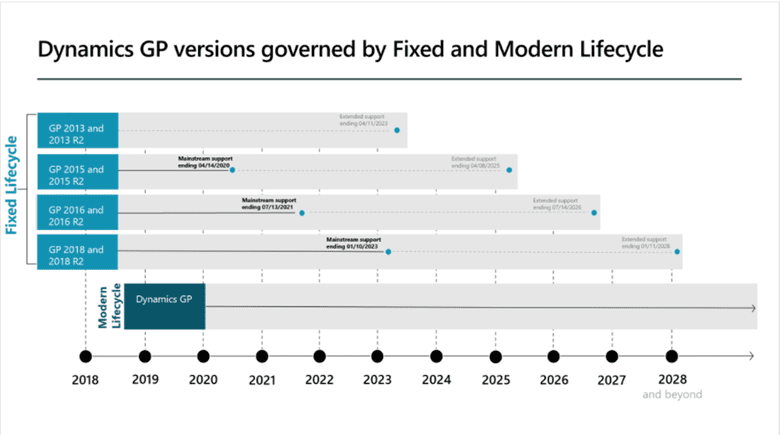
Before October of 2019, Microsoft Dynamics GP was governed by the Fixed Lifecycle Policy which meant each GP version had a definite end date for support. Older versions of Dynamics GP, including GP 2013 to GP 2018 R2, continue to be governed by the Fixed Lifecycle Policy. See below for the extended support deadline for these Dynamics GP versions:
-
- Dynamics GP 2013 and GP 2013 R2 – ends April 11, 2023
- Dynamics GP 2015 and GP 2015 R2 – ends April 8, 2025
- Dynamics GP 2016 and GP 2016 R2 – ends July 14, 2026
- Dynamics GP 2018 and GP 2018 R2 – ends January 11, 2028
However, Microsoft launched the new Modern Lifecycle Policy for Dynamics GP in October of 2019 which offers continuous support and servicing for Dynamics GP versions after GP 2018 R2. The continuous support includes exciting features, bug fixes and the latest tax updates.
Microsoft typically releases Dynamics GP updates three times a year in June, October and December. The June and December releases include tax updates, hotfixes and relevant regulatory updates. The October release includes hotfixes as well as new features to enhance business success. The Modern Lifecycle Policy helps GP customers stay current and leverage the newest technology and capabilities by encouraging users to implement at least one of the three Dynamics GP releases each year. These releases are all-inclusive, and they are much easier to deploy and manage compared to larger version releases with the Fixed Lifecycle Policy.
Microsoft remains dedicated to developing and supporting Dynamics GP as the Modern Lifecycle Policy now reflects a future GP strategy roadmap which extends into 2028 and beyond, with no end in sight!
BCS is thrilled about the Lifecycle Roadmap for Dynamics GP, and we look forward to implementing, integrating, customizing and supporting GP solutions for many years to come.
For more information on the Lifecycle Update for Dynamics GP, please read through the Microsoft documentation. To ensure that your GP solution is up to date so you can leverage the immense benefits of the Modern Lifecycle Policy, please contact our BCS Team at sales@BondConsultingServices.com or schedule a free consultation!

Close a Partially Received Purchase Order with a Prepayment
Bond Consulting Services (BCS) was recently approached by a leading wholesale client to provide support on how to close a partially received Purchase Order that has a Prepayment in Dynamics 365 Business Central.
Business Central offers a simple solution when closing a Purchase Order, even if it has been partially received and has a Prepayment.
Earlier, in our scenario, the Prepayment Invoice was created, and the order was partially Received. If, for any reason, the Prepayment Invoice needs to be cancelled, a Prepayment Credit Memo will have to be created. Follow the steps below:
1. In the Prepayment section of the Purchase Order, populate the Vendor Cr. Memo No. field.

2. In the General section of the Purchase Order, change the Vendor Invoice No. to the new updated number that was received from the vendor.

3. In the Menu, select Actions > Posting > Prepayment > Post Prepayment Credit Memo.

4. Select Yes when the system asks if you want to post a credit memo for the prepayment.

5. A Credit Memo will be created and can be found under the Related menu. Select Related > Documents > Prepayment Credit Memos.

6. To close the Purchase Order, choose the Reopen option.

7. Change the Quantity field to the Quantity Received.

8. Remove the prepayment from the Prepayment % field.

9. Click Yes when the system asks if you want to update the lines.

10. The Purchase Order can now be fully Invoiced for the partial order.

The order will then be fully closed and automatically deleted. All accounts can be verified in the General Journal Entries and Vendor Ledger Entries window.
This process is typically for special use cases when a customer receives some amount of product from a Purchase Order, but the vendor ran out of supplies to complete the full order. If this ever happens to you or a customer, make sure to follow the simple steps above to efficiently and successfully close a partially received Purchase Order that has a Prepayment.
For more information on how Dynamics 365 Business Central makes it easy to complete complicated business processes, reach out to our expert team of consultants at sales@BondConsultingServices.com or schedule a free consultation!

10 Major Advantages of Dynamics 365 Business Central
Bond Consulting Services’ three-letter acronym (BCS) can easily be interchanged with Business Central Success as we specialize in configuring and customizing Dynamics 365 Business Central to meet our clients’ unique needs. Dynamics 365 Business Central is Microsoft’s premier cloud-based software as a service accounting application that is easy to use and adapt.
If you want to grow beyond the limits of your basic accounting software and are considering migrating to Business Central from Dynamics GP or any other ERP software, continue reading to learn about the 10 major advantages that Dynamics 365 Business Central will provide your business!
10 Major Advantages of Business Central:
1. Stay up to date on the latest Microsoft cloud-powered technology
Microsoft automatically updates the Business Central tenet so you do not have to worry about the expense and hassle of upgrades, backups and patches. Microsoft launches new upgrades in release waves twice a year which occurs in April and October, but you have the option to decide when you want the latest upgrades to take effect in your environment so your team can adjust and ease into the new functionality. Users can also see what the Microsoft research and development team is planning for the next upcoming release waves and learn more information about each update in the Microsoft Learning documentation. If any patches occur, the Microsoft Team automatically fixes them so you do not have to worry about troubleshooting or lost productivity. Business Central also supports disaster recovery and automatic backups that store your data for up to 30 days.
2. Decrease total cost of ownership
Business Central’s pricing model is a predictable operating expense that is billed monthly so you do not have to worry about inflexible service contracts. Business Central will reduce your total cost of ownership as it leverages a modern user interface that is based on familiar Office tools so you have less training time and a faster return on investment.
3. Intelligent decisions with advanced analytics
Business Central includes built-in AI capabilities so users can access, model and analyze data across multiple dimensions. The Business Central environment includes cash flow forecasting and late payment predictors that enable users to see if a payment will come in late, so you are always on top of your finances. Users can also easily sync data with Power BI to create rich, interactive visuals such as charts, graphs and dashboards to quickly analyze important metrics and gather actionable insights.
4. Build powerful apps with the Microsoft Cloud
Business Central seamlessly connects to the Microsoft Power Platform including Power BI, Power Automate, Power Apps and AI Builder so you can build apps specific to your business processes. The entire Power Platform can be accessed from one Azure Active Directory, so you have all the information you need to build successful apps centralized in one location. Business Central also extends with data and intelligence platforms such as the Common Data Service, Connectors and Gateways, the AI Platform and social media apps so you can connect your data across your entire environment.
5. Modern client updated user interface
Business Central includes a modern client updated interface that can be accessed simply by logging in to the environment on any device, whether it be a laptop, phone or tablet. The updated user interface consists of a centralized dashboard with a role center and relevant lists and tiles that can be drilled down. For example, Business Central includes a master list of all of your customers and their outstanding balances that you can easily click into and see their transactions, communication and historical data. All you need to access Business Central’s modern client updated user interface is an internet connection which makes working from home and staying connected a breeze!

6. Personalize to your needs
Business Central and other Dynamics 365 applications can be easily customized to fit your specific needs. For instance, users can move or modify any fields, lists and tiles, and users can even remove whole sections from their dashboard if they are not using them. Users can also drag and drop fields exactly where they would like them, and bookmark fields for easy access and analysis. With Power BI integration, users can seamlessly customize Power BI reports and automatically see the most important items and metrics in your environment.

7. Connect third-party apps
Dynamics 365 Business Central extends with third-party apps and business add-ons that can be found in Microsoft AppSource. There are currently 1,529 Business Central apps in AppSource that you can search, download and connect to your environment to enhance a certain functionality. For instance, Microsoft AppSource includes dozens if not hundreds of apps for payroll, time sheets, taxes, inventory and much more. Business Central also extends with Microsoft 365, the Power Platform and the Azure Cloud Platform so you always have global access, enhanced security and flexibility.
8. Simplify common tasks with seamless integration
Business Central seamlessly integrates with other Microsoft products including Dynamics 365 Sales, Dynamics 365 Customer Service, Office 365 and Microsoft Teams so you have an end-to-end view of your business operations. Office 365 integration enables users to send emails, set up customers or vendors, process orders, create quotes and submit invoices without ever having to leave their Outlook inbox. Microsoft Teams integration enables users to accomplish all their tasks right in Teams without ever having to login to Business Central. For instance, users can pull up a customer contact card, drill into the details, review historical interactions and create a sales quote right from Microsoft Teams. Additionally, users can easily export data from Business Central into Excel and create outgoing documents in Word. Creating or modifying data in Excel is an excellent functionality as it is familiar and easy to manage, and will be automatically uploaded back into your Business Central environment.

9. Gain peace of mind
Gain peace of mind with Business Central as your critical business data will be protected in highly secured data centers that are managed by Microsoft. Business Central has a monthly service availability of 99.9%, which means you should be able to connect to your Business Central environment 99.9% of the time from anywhere and on any device. If your service availability falls below 99.9%, you will see a monthly credit in your service plan. Business Central is also built-in with enhanced security measures such as identity permissions, authentications, and data backups so you can focus on what matters most for your business.
10. New enablement and MS Learn
The Business Central environment includes a help center where you can find additional information on specific features and functionalities. There are five main help options including documentation, common answers, a community page, relevant blogs and a support center so you can find all of the details you need in one centralized location. The Microsoft Learn website also provides extensive documentation on everything Dynamics 365 including introductory modules and more advanced training. The Microsoft Learn website is a great way to advance your skills, onboard new employees and earn business certifications with step-by-step instructions.
The 10 advantages listed above are only some of the major benefits provided by Dynamics 365 Business Central and the Microsoft Cloud. Dynamics 365 Business Central is easy to deploy, customize and leverage to increase sales, connect with customers, streamline operations and enhance business success.
To learn more about Dynamics 365 Business Central and its impressive capabilities, please reach out to our BCS Team by contacting sales@BondConsultingServices.com or scheduling a free consultation!

Enhance Your Capacity Scheduling in Dynamics 365 Business Central with MxAPS from Insight Works
Insight Works is a leading global supplier of distribution and manufacturing software for Dynamics 365 Business Central and a trusted partner of Bond Consulting Services (BCS). Insight Works has a worldwide client base and dozens of solutions such as Shop Floor Insight, Advanced Inventory Count, Warehouse Insight, Dynamic Ship, WMS Express and many more, to automate operational processes and increase productivity leveraging Dynamics 365 Business Central.
Insight Works recently released their MxAPS solution for Advanced Finite Capacity Scheduling in Business Central. MxAPS makes planning and scheduling simple for a variety of industries through its repeatable and systemized processes, advanced capabilities and customizable features. Continue reading to learn more about the immense benefits and powerful capabilities of MxAPS below!
How Does MxAPS Help with Planning and Scheduling?
The Graphical Scheduler tool in Business Central enables users to create schedules for their organization, but it is very time consuming and often frustrating as it requires manual effort of dragging and dropping important data into the calendar.

MxAPS simplifies and automates this process of building a schedule by enabling users to leverage the Generate Production Schedule tool in which they simply enter information such as the start date, schedule duration, and any relevant filters, hit a button, and then the updated schedule will generate within 10 seconds or less.

After creating a schedule, users can run “what-if scenarios” in their schedule, such as comparing which orders will be late and which will be early, to optimize resources and equipment and determine which schedule you actually want to execute.

Additionally, users can graph the generated schedules in the Graphical Scheduler tool in Business Central to visually see the layout of time, equipment required, employees scheduled and process segments for setup of the project. MxAPS supports color changes, tooling changes, breaks, cool down time, and many other instances so you can have an end-to-end view of what your schedule should look like.

For instance, an automotive company can test different segments to determine the appropriate welding stations and machines to use for a particular project before involving your customer or other members of your team. MxAPS will tell you the exact capacity you need to execute your planned schedule and if there will be any potential issues or overloads throughout the duration of the project. After running the schedule and reviewing the important statistics and graphs, users that are satisfied with the schedule can press “Commit Results”, and MxAPS will automatically update the schedule start and end times in Business Central and send the schedule to the shop floor for execution.
MxAPS enhances Business Central’s already powerful features by enabling users to generate a Production Schedule in a few short seconds compared to several days of planning and manual input. Simply submit your schedule, review and compare the results, send it to the shop floor and then you are free to focus on what matters most for your business.
Several top organizations across a variety of industries such as Mitsubishi Motors, The Washington Post, Johnson & Johnson, Haynes International and many more, are already utilizing MxAPS for their planning and scheduling needs and are loving the results! MxAPS has enabled its users to achieve a 50% increase in throughput, a 10-30% reduction in direct and indirect labor hours, a 50% reduction in setup time, and a 15-25% increase in resource utilization among other impressive results.
The MxAPS stand-alone application for Business Central on-premises is available now and can be installed at any time. The MxAPS cloud-based application for the Business Central cloud will be available on AppSource beginning in June of 2021 with Advanced Constraints available in August of 2021. Check out the full list of MxAPS’ powerful capabilities below!
The Powerful Capabilities of MxAPS:
- Finite capacity for forward scheduling
- Automatic machine center selection
- Automatic machine alternates for special cases
- Order sequencing
- Configurable scheduling rules
- Lot splitting by number of lots or lot quantity
- “Net Change” rescheduling for equipment downtime and priority changes
- Planned equipment maintenance scheduling
- Advanced process modelling
- Non-production scheduling
- Multi-segment setup reduction
- Advanced constraints for material, labor, tooling and more
To learn more about MxAPS and other Business Central applications from Insight Works, please visit the Insight Works website and contact their team.
For more information on how you can leverage MxAPS and Dynamics 365 Business Central to increase success for your business, please schedule a free consultation with our BCS Team or contact sales@BondConsultingServices.com to reach out to our expert team of consultants.

Issuing Customer Refunds & Credit Memos
Bond Consulting Services (BCS) was recently approached by a leading provider of hardware maintenance and repair services to simplify their refund and rebate processes for clients within their Dynamics 365 Business Central instance. The company issues many refunds to customers on a monthly basis and desired a system for easily issuing refunds to customers rather than through vendors.
Initially, the hardware provider had to create a vendor each time they issued a refund which took extra time and effort out of their day. Business Central also enables users to submit refunds directly to customers through the Payment Journals module, which many users are unaware of.
If you want to issue a payment to a Customer, in your Business Central instance, create a Sales Credit Memo for the Amount to refund and use the Payment Journals to issues a check.
First, open the Sales Credit Memo module in Business Central, select the Customer, the G/L Account, change the Description and type in “1” in the Quantity and the Amount to refund. After filling out the required fields, you can quickly post the Credit Memo for the specific company.

Then open the Payment Journals. Instead of selecting Vendor as the default “Account Type”, select “Customer”, the “Customer No.” and select Refund as the “Document Type”. Do not populate “Document No.” if you are printing a Check; the system will automatically generate it.

In “Applies-to Doc. Type”, select Credit Memo, and in “Applies-to Doc. No.” select the appropriate Credit Memo for that Customer. The Amount field will be populated with the Amount entered for the Credit Memo. Lastly, if you are issuing a Computer Check, in “Bank Payment Type”, select “Computer Check”.
To print the Check, click on “Check” and “Print Check”, the system will automatically issue a check to the Customer that is the same as issuing a check to a vendor.

Once you have completed the steps to print the Check, post the Journal, you can go back to your Customer Ledger Entries and see the issued credit memo and refund in the Ledger.

This process of issuing a Refund and Credit Memo directly to a customer eliminates the need to create a vendor for individualized refunds, saving you time, manual effort, and expensive employee costs. The system automatically updates to reflect the payments, so they have an end-to-end view of the customer journey. Creating a customer refund is a default functionality in Business Central that can be completed by any user with access to the Payment Journals and issuing credit memos.
To learn more about the powerful capabilities of Dynamics 365 Business Central, please contact our BCS Team at (562) 988-3451 or schedule a free consultation!

Dynamics 365 Finance for Successful Mergers and Acquisitions
Dynamics 365 Finance is Microsoft’s financial and operational management software that helps businesses of all sizes work smarter with connected operations, deliver exceptional customer experiences, enhance business performance, and get real-time insights on any device, anywhere, at anytime. Bond Consulting Services (BCS) especially recommends Dynamics 365 Finance if your organization is experiencing a merger or acquisition as there are many built-in tools to fast track the process and enhance business success.
Dynamics 365 Finance Features for Mergers & Acquisitions:
1. Global Templates: Dynamics 365 Finance consists of global templates which you can use to create consistency and speed up the rollout of your technology solutions to disparate companies around the world. These templates can be customized, localized and standardized to consider legal and government regulations, currency and taxes, exchange rates, data configuration and much more. Dynamics 365 Finance’s global templates include many unique capabilities to connect various companies or operational processes across your organization:
-
-
- Shared Chart of Accounts: The global templates support a shared Chart of Accounts in which users simply create a single chart with any accounts and link the chart into the Dynamics 365 Finance ledger in each company. Sharing a Chart of Accounts within Dynamics 365 Finance is very beneficial for organizations that are going through a merger or acquisition as it creates a legal entity override so you can manage the exceptions and disable accounts where they are not needed. With a shared Chart of Accounts, you will have one common global template and each company will have the same template with their own small variances.
-
- Cross-Company Data Sharing: The global templates enable cross-company data sharing so companies can share payment terms, delivery terms or other master data like customers and vendors across legal entities by defining policies to determine exactly which data will be shared and to which entities. An update to these data sets makes the same changes effective to all the companies where the data is being shared.
-

-
-
- Shared Services: Along with cross-company data sharing, the global templates in Dynamics 365 Finance promote shared services. Organizations that have disparate companies around the globe typically employ shared services to reduce costs and standardize business processes. Dynamics 365 Finance shared services supports quick data entry and visibility of transactions across your organization.
-
- Organization Hierarchy: The global templates help to establish an organization hierarchy to provide flexibility to your business model. The organization hierarchy feature can be used to model your business visually, or to link your Chart of Accounts to ensure that the correct combination of financial dimensions is being used in transactions.
-

2. Change Management: Dynamics 365 Finance consists of four powerful tools to support organizational change caused by a merger or acquisition.
-
-
- Azure DevOps: Azure DevOps helps you plan, track and discuss work across your teams by automatically updating project developments and details regarding issues and risks.
-
- Task Recorder: The Task Recorder in Dynamics 365 Finance is a utility that enables users to record business processes for guided tours, documentation, regression tests, or automatic playbacks. The Task Recorder will help ensure that users know how to complete the business processes in the new system as part of the merger or acquisition.
-
- Feature Management: Feature Management in Dynamics 365 Finance provides an easy-to-use workspace where you can view a list of the new features in each release. Feature Management enables users to turn off and on new features, view the supporting documentation for the features, or develop a strategy for when to launch the new features. This capability is very important as it encourages incremental changes to your business so your team and customers are not overwhelmed during a merger or acquisition.
-
- Data Effectivity: Data Effectivity in Dynamics 365 Finance enables users to track changes to records which is useful for organizational planning and historical auditing. Users can also actively make updates to data sources and set a future effective date to when those changes will take place, allowing your organization to plan ahead.
-
3. Governance: Project Governance ensures visibility, responsiveness and strategic direction for your organization which helps drive project decisions. Dynamics 365 Finance includes two main tools to help you maintain your Project Governance:
-
-
- Lifecycle Services: Lifecycle Services in Dynamics 365 Finance is a hub for customers to manage the application lifecycle for a project. The module provides specific project methodologies and a business process modeler, and it can be integrated with Azure DevOps.
-

-
-
- Azure DevOps: Azure DevOps in Dynamics 365 Finance includes process templates, test plans to support testing and reporting, and pipelines for automated deployment. Users can create custom dashboards and reports in Azure DevOps to track the status of projects and provide a rundown of tasks.
-

4. FastTrack for Dynamics 365: Dynamics 365 Finance comes with a free service called FastTrack for Dynamics 365 that is available to eligible customers. FastTrack is designed to accelerate digital transformation and it will validate your solution architecture, provide recommended practices, help you avoid common pitfalls, mitigate risk and increase user adoption. This service is especially helpful for organizations undergoing a merger or acquisition as it will ensure optimized use of Dynamics 365 Finance across your organization.
For more information on Dynamics 365 Finance, please visit our BCS website or schedule a free consultation today!

What is Dynamics 365 Supply Chain Management?
In this new age of digital transformation, it is increasingly important to empower your manufacturers and supply chain managers to leverage advanced technology and stay connected. Dynamics 365 Supply Chain Management is an operational and warehouse management software that is powered by the Microsoft Cloud to provide predictive insights, manufacturing productivity and supply chain agility through IoT, AI and mixed reality. Dynamics 365 Supply Chain Management speeds up your information flow and provides powerful capabilities to enhance your production process. Check out some of the advanced features of Dynamics 365 Supply Chain Management below!
How Dynamics 365 Supply Chain Management Will Optimize Your Operations:
1. Scalable Configuration Models: Users can easily create scalable configuration models with embedded constraints so product attributes and customer requirements can be configured during the sales process. The scalable models automatically generate a listing of required materials and routes for the production and delivery process. Through the models, users can specify if they want to make a product to stock, make to order, configure to order or engineer to order.
2. Personalized Production Floor Management Workspace: The production floor management workspace provides an overview of all jobs in progress in the area. The workspace consists of tiles in which users can instantly view pending production orders, release pages, and material availability before moving orders to the production floor. The workspace also has default Gantt charts to increase the transparency of ongoing operations, easily adjust schedules to predict future outcomes, and discover problems before the customer receives your product.

3. Accounting & Forecasting: Dynamics 365 Supply Chain Management includes detailed breakdowns of material costs, variances and indirect costs so you can manage your finances and predict future budgets.
4. Production Control: The Production Control feature in Dynamics 365 Supply Chain Management enables manufacturers and floor managers to view and prioritize job lists on their lines or in the area via mobile devices or job card devices while on the shop floor.

5. Custom Reporting: Dynamics 365 Supply Chain Management users can easily create custom reports from embedded strategies and captured data to optimize operations and discover hidden trends.
6. Distributed Order Management: Every industry has its own unique management demands such as routing, traceability, valuation, and component dependencies that complicate the supply management process. Dynamics 365 Supply Chain Management facilitates the oversight of these demands and moves products beyond the factory floor by supporting operational criteria (quality checks, profit margins, picking cycles, revisions) and providing detailed manufacturing and fulfillment costs.
7. Streamlined Collaboration: Dynamics 365 Supply Chain Management encourages collaboration between multiple vendors and automatically updates vendor master data to maintain clear communication throughout the entirety of your supply chain.
8. Power BI Integration: Dynamics 365 Supply Chain Management integrates with Power BI to support aggregation, analytics, and important insights on every transaction from ordering, to warehousing, to transport, to delivery. Power BI integration enables manufacturers to be reactive to market diversity, leverage intelligent insights on production costs to promote optimum efficiency, and scale routing to meet production demand. The Power BI Warehousing Pack further enhances your inventory and warehouse operations by providing an out-of-the-box scanning solution with advanced business intelligence so managers can instantly see counting, on-hand precision and outbound shipping processes.

9. Customer Returns: Dynamics 365 Supply Chain Management simplifies customer returns by tracking every returned product and the reason for the return to minimize future returns through predictive insights.
10. Order Transportation: There is a separate module within Dynamics 365 Supply Chain Management to optimize the transport of products and orders so manufacturers can effectively manage containers, vehicles, loads and routes to meet deadlines and exceed customer expectations.
To learn more about the powerful capabilities of Dynamics 365 Supply Chain Management, please visit our BCS website or contact our Team at (562) 988-3451.

Field Level Security
Bond Consulting Services (BCS) understands the immense importance of protecting your critical business data from cybersecurity attacks and unauthorized users. Microsoft Dynamics solutions include many built-in levels of security such as identity permissions, encryption, authentication and data loss prevention tools so you can focus on what matters most for your business.
One of these great security tools is Field Level Security in Dynamics GP which restricts access to fields, windows or forms by requiring a password. Ensuring users have password clearance is very helpful as it prevents unauthorized users from accessing and altering sensitive data such as item costs, credit limits, and purchase orders. If you would like to hide fields from certain users and enhance your data security, follow the steps below to establish Field Level Security in your Dynamics GP instance. You must be an administrator in the system to setup Field Level Security:
1. Navigate to your Microsoft Dynamics GP instance. From the top menu, select Tools > Setup > System > Field Level Security.

2. In the Field Level Security window, click the Add icon to create a new Field Level Security role.

3. Populate the Field Security ID and the Description. Then, select the Product Name lookup icon.

4. Select whichever field from the modules available that you would like to set Field Level Security for. In this example, we selected a field from the Sales module but you could also add Field Level Security for Inventory, Purchasing, Payroll and many others. Next, select the appropriate GP window and the GP field from the right-hand pane that you would like to set Field Level Security for.

5. Now you can select the appropriate Security Mode from the drop-down list provided. This step is very powerful as you can decide how you want your Field Level Security to work. You can select to require a password before or after the session, you can setup a warning, you can lock the field, hide the field, or even disable it. If you select a Security Mode that requires a password, a Password ID will have to be created. Click Save in the top menu.

6. Within the Field Level Security screen, select the user(s), the companies where it should be applied, and the Field Security ID. Then, click OK.

If a Field Security ID is not checked, it is not currently enabled in the system. You can instantly enable or disable Field Level Security restrictions by selecting or deselecting the checkboxes in the Field Level Security screen.
7. Completing steps 1-6 will enable Field Level Security in your Dynamics GP instance and enhance your data protection and security by requiring a password or hiding the specific field from unauthorized users.

Field Level Security is a very quick and easy way to protect your business data and ensure that employees only have access to the data and information they need to complete their jobs to the best of their ability. This powerful tool is a default functionality in Dynamics GP so it can be added for any business or organization, but you must be an administrator to setup the Field Level Security restrictions.
To learn more about the unique capabilities of Dynamics GP and how they can be leveraged to enhance your business success, please contact our BCS Team at sales@BondConsultingServices.com or schedule a free consultation on our website.

What is Dynamics 365 Customer Voice?
Dynamics 365 Customer Voice is Microsoft’s new scalable feedback management solution that helps businesses of all sizes connect with their customers and deliver exceptional experiences. Dynamics 365 Customer Voice delivers real-time feedback and actionable insights in a centralized location so you are always in the know when it comes to customer engagement and business operations. Check out the advanced capabilities in Dynamics 365 Customer Voice below!
Benefits of Dynamics 365 Customer Voice:
1. Customized survey features: Continuously track customer sentiment and perceptions of your products and services with personalized and customizable surveys so you can capture feedback immediately.

2. Optimized metrics: Leveraging advanced AI capabilities, Dynamics 365 Customer Voice uncovers hidden trends and important metrics to streamline your data analysis process and drive business opportunities.

3. Predictive insights: Dynamics 365 Customer Voice includes customized workflows and dashboards including the Customer Management Dashboard to provide day to day insights on support trends, activities, social media interactions and more to encourage proactive engagement with customers in the moments that matter.

4. Omnichannel distribution and collection: Integrate data across your organization so all of your most critical business data is in one centralized location. Align team members on engagement decisions across channels by building unified customer profiles within your customer data platform.

5. Automatic alerts and triggers: Send automatic alerts and triggers to customers to gather real-time follow-up data and provide personalized and contextual interactions across the customer journey, through any channel and from any device.

To learn more about the powerful benefits of Dynamics 365 Customer Voice, please visit our BCS website or reach out to our expert consultants by calling (562) 988-3451 or scheduling a free consultation!