

Protect Your Business Data with Privileged Identity Management in Azure Active Directory
Microsoft Azure is a cloud platform that provides hundreds of products and services to manage business applications and solve challenging problems. Microsoft Azure leverages cloud storage, Virtual Machines, Data Lakes, SQL Servers and an Active Directory to build, test and deploy applications leveraging your favorite tools and frameworks. The Active Directory is an essential aspect of Microsoft Azure as it manages users, licenses, permissions and devices from a single, unified dashboard.
Our consultants at Bond Consulting Services (BCS) are experts in implementing, integrating, customizing and supporting Microsoft Azure, and they continue to push the boundaries of Azure capabilities to boost success for our clients. For instance, our consultants have recently been working closely with Privileged Identity Management within the Azure Active Directory to improve the productivity and protect the business data of our clients.
Privileged Identity Management in Azure Active Directory:
Privileged Identity Management (PIM) in the Azure Active Directory is a functionality that enables Office 365 administrators to approve of temporary admin status for other employees.

Granting admin status in Microsoft Azure and other business applications can be very risky as it can compromise your passwords and leave your business open to cybersecurity attacks.
The new PIM functionality improves cybersecurity and protects your important business data by ensuring employees request permission before being granted admin status, and automatically shutting off admin status once they are finished. Users in the Azure Active Directory can request temporary admin status for a few minutes, hours or days, and they will receive an email via Outlook granting them the status until the requested time is up.
Improve productivity and protect your business data by leveraging the powerful PIM functionality within Azure Active Directory!
For more information on how to leverage the power of the Microsoft cloud and experience unlimited scalability with Microsoft Azure, please reach out to our BCS Team at (562) 988-3451 or schedule a free consultation!


Offer B2B Customers Intuitive Buying Experiences with Dynamics 365 Commerce!
The ongoing COVID pandemic has completely transformed consumer habits to center around digital and self-service purchasing through eCommerce channels. Therefore, retailers have had to evolve with the changing times to cater to the new expectations while maintaining buyer needs.
Dynamics 365 Commerce is Microsoft’s premier end-to-end retail solution that helps retailers create amazing customer experiences, support their employees and optimize business operations. Bond Consulting Services (BCS) specializes in implementing, integrating, customizing and supporting Dynamics 365 Commerce to boost eCommerce visibility and sales for businesses of all sizes. Microsoft recently launched new updates and capabilities for Dynamics 365 Commerce to support both B2C and B2B customers and transform business processes to support new digital channels.
Dynamics 365 Commerce B2B Overview:
The new B2B eCommerce capabilities for Dynamics 365 Commerce enables organizations across various industries to digitize their transactions with user-friendly, self-service and personalized experiences, while still providing the unique capabilities needed for a B2B users. Check out some of the cool new features below!
1. Dynamics 365 Commerce now supports varied channels and Headless Commerce Engine to deliver retail experiences anywhere your customers or partners are buying.
2. Dynamics 365 Commerce includes AI and ML driven features such as Distributed Order Management, Accessibility Insights and Product Recommendations to enhance operations and engage customers.

3. Dynamics 365 Commerce’s robust architecture easily handles internet-scale without compromising user experiences so you can extend and implement new omnichannel business processes with minimal effort and cost.
4. Dynamics 365 Commerce now provides a single solution for both B2B and B2C customers to streamline business operations and increase your supply chain agility and retail visibility.
5. Dynamics 365 Commerce integrates with Dynamics 365 Sales, Dynamics 365 Customer Service and Power Virtual Agent to enhance the customer journey and support your lead and opportunity management.

6. Dynamics 365 Commerce can be used to boost sales and eCommerce success across a variety of industries from Automotive to Manufacturing to much more!
7. Dynamics 365 Commerce provides a complete end-to-end commerce experience through Merchandising, Digital Experiences, Inventory Management Supply Chain and Management Store Operations.
8. Dynamics 365 Commerce makes Business Partner Onboarding simple by allowing business partners to submit a request for onboarding, enabling administrators to review and approve the onboarding request, and designating the requestor as administrator for the B2B business partner.
9. Dynamics 365 Commerce enhances merchandising and ordering by using Order Templates for quick order entry and supporting quantity thresholds in the ordering flow as well as support on the account payment method.
10. Dynamics 365 Commerce encourages self-service purchasing and enables the administrator to view order history across the entire organization, request account statements and invoice documents, and support the payment of open sales invoices.
To learn more about how Dynamics 365 Commerce can elevate your retail business, please contact our BCS Team at (562) 988-3451 or sales@BondConsultingServices.com.

Correcting Dimensions in Business Central
With the release of Business Central version 18, Microsoft has included a new tool to correct dimensions for general ledger entries. Before this release, if a dimension was assigned incorrectly in a transaction a user would need to reverse the entry and re-enter it. Users will now be able to avoid the need to reverse the entry and simply correct the dimension. The Dimension Correction Tool includes:
-
- Ability to correct assigned dimensions on G/L Entries
- Trace history of corrections to a G/L entry
- Undo Corrections made
- Immediate run or background job
- Separate update of analysis Views and Cost Accounting
To make a correction, you will find the option within the General Ledger Entries window under Entry > Correct Dimensions.

In the Draft Dimension Correction page, you can specify the dimension code that you want to change and then select “Run” for the change to take effect.

A page will come up allowing you to either schedule the job to make the change or immediately run the change.
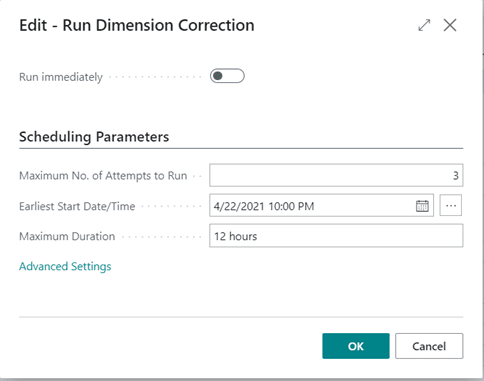
Once the change is made, you will receive a confirmation that the process was successful.

Users will be able to review the history of changes made by selecting Entry > History of Dimension Corrections. If needed, the changes can also be undone within this page.

At this point, this tool will only affect the general ledger and it will not adjust the subledgers. There will be a discrepancy between ledgers when a change is made, but if you are looking for the financial reports to be correct, then this will allow users to save time in their day to day activities within Business Central.
To learn more about how Dynamics 365 Business Central can help your business, please contact sales@BondConsultingServices.com or schedule a free consultation on our website!

Enhance Your Work from Home Productivity with Dynamics 365 Finance!
Dynamics 365 Finance is Microsoft’s premier financial management solution that will automate and enhance your financial operations to boost business productivity. Bond Consulting Services (BCS) specializes in implementing, integrating, customizing and supporting Dynamics 365 Finance as we know the solution has the power to transform financial management and business success for companies of all sizes. Dynamics 365 Finance centers around 3 main business goals:
1. Task Automation and Coordination: Dynamics 365 Finance is seamlessly integrated with Microsoft Teams and the Power Platform to enable users to view important information and collaborate with teammates using tools they are familiar with.

Microsoft is aware that creating and maintaining a budget can be a manual, repetitive and time-consuming process. Therefore, Dynamics 365 Finance enables users to seamlessly create budget proposals based on past budget usage. Dynamics 365 Finance compiles multiple years of historical data to forecast what the budget should look like in a certain period. Users can then post the aggregated budget in Microsoft Teams so coworkers can easily view and update the budget plan in Excel. Teams and Excel have a direct data connection to Dynamics 365 so any changes to the budget are immediately updated in your Dynamics 365 Finance instance.

Dynamics 365 Finance also includes several important dashboards for streamlined data analysis. The Financial Period Closed Workspace enables users to see exactly where their teammates are at on a certain project or functional area. Users can also leverage the chat box in the Closed Workspace to quickly answer questions such as: “Show budget for the IT Department”. This functionality enables users to get an accurate prediction of what their budget looks like and if they will meet or exceed that budget at the end of the quarter. The Financial Analysis Dashboard leverages Power BI to provide rich and interactive infographics and visuals to easily explore data and discover hidden trends. Users can seamlessly drill down through the transactions to see exact expenses and gain actionable insights.

2. Managing Tasks While on the Go: In addition to the already powerful benefits of Dynamics 365 Finance, employees can access their Dynamics 365 solution and Microsoft Teams platform on any device (phone, tablet, laptop, desktop, etc.) so you can get your work done from anywhere at any time!
3. Focusing on Key Financial Tasks: Due to the ongoing COVID pandemic, many employees continue to work from home which can cause distractions and decreased productivity. Dynamics 365 Finance helps you focus on your most important tasks by infusing Artificial Intelligence into Customer Payment Insights. The powerful AI capabilities will determine customers that are prone to paying late and are of the highest risk so you can ensure that all expenses are up to date. AI Customer Payment Insights offers flexibility to your ever-changing business needs by providing the most important insights right off the bat!
To learn more about the impressive capabilities of Dynamics 365 Finance, or to boost your work from home productivity, please contact our BCS Team at sales@lime-falcon-860444.hostingersite.com or schedule a free consultation!

Troubleshooting Dynamics GP Window Scaling Issues on High Resolution Displays
If you are having issues with your Dynamics GP windows appearing too small or too large on one or more monitors, one quick fix to try would be the following:
1. Close out of Dynamics GP.
2. Click on the Dynamics GP icon (from the desktop or taskbar) and select Properties.
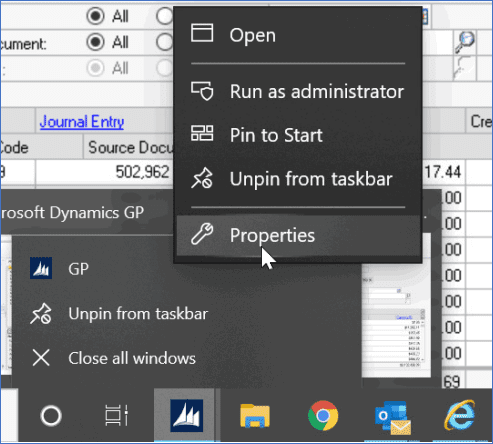
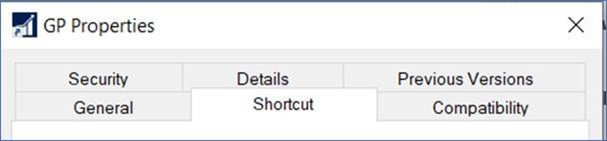
3. Within the GP Properties window, click on the Compatibility tab.
4. Within the Compatibility tab, click on the ‘Change high DPI settings’ button and then mark the checkbox to ‘Override high DPI scaling behavior’ within the additional GP Properties window that appears. In addition, select the ‘System’ option from the drop-down menu before clicking the ‘OK’ button on that same window.
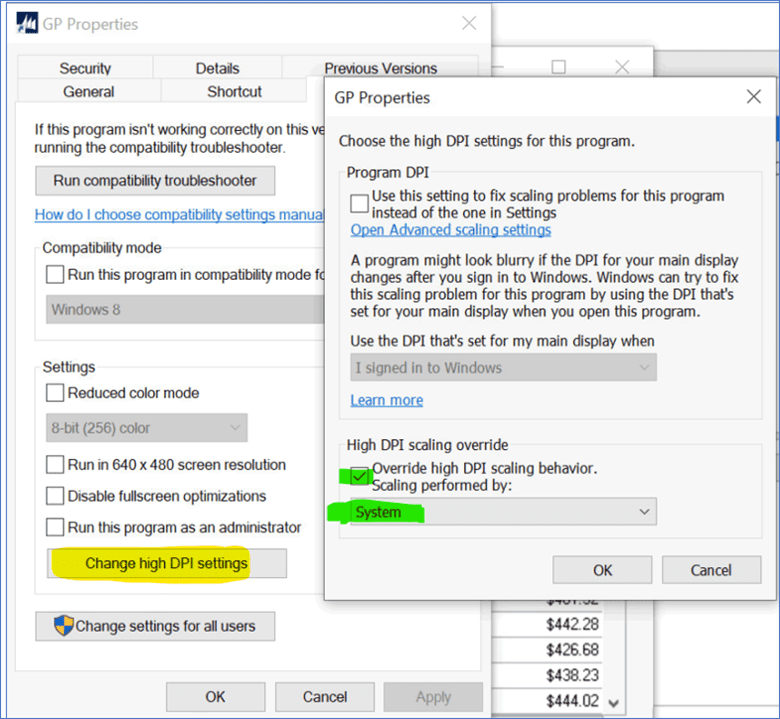
5. Within the main GP Properties window, click the ‘Apply’ button.
6. Click the ‘OK’ button to close the main GP Properties window.
7. And finally, launch Dynamics GP and log in to verify that the transaction/ inquiry windows are displaying as expected.
For more information on how to optimize your operations with Dynamics GP, please visit our BCS website or contact the BCS Team at sales@BondConsultingServices.com or (562) 988-3451!

How to Choose a Mobile Device to use with Business Central
Here at Bond Consulting Services (BCS), we work with many great Independent Software Vendors (ISVs) in an effort to provide our customers with solutions that work for them and deliver value. One of our trusted ISV partners, Insight Works, created this blog to provide some best practices and optimize your use of Dynamics 365 Business Central.
The first barcode was introduced on June 26, 1974. A 10-pack of Wrigley’s Juicy Fruit chewing gum was scanned at 8:01 am at a Marsh supermarket in Troy, Ohio. Since then, the use of barcodes has exploded and can be found almost anywhere and on virtually any product. As barcodes have evolved, so has the hardware used to scan barcodes. In this article, we will help simplify the task of choosing a mobile computer (also known as barcode scanners and mobile devices) to scan barcodes.
If you’ve ever looked closely at a mobile computer datasheet, you’ll likely see up to 40 different specifications listed. Forget those, for now. Here is what you should focus on:
Five Primary Decision Factors
- Ruggedness
- Scan Range
- Camera
- Form Factor
- Price
1. Ruggedness: In what type of environment will the device be used?
In what type of environment are you working? Is the environment dusty? Wet or humid? Cold? Is there potential for the device to be dropped from 4 feet? 10 feet?
Based on the environment, there are two main factors to consider:
Drop resistance: Nearly all mobile devices will have a drop spec. The higher the drop spec, the more rugged the device. For someone working in a clean, retail environment with carpet flooring, a 4′ drop spec may suffice. A busy warehouse with forklifts and ladders to reach pallet racking, a 10′ drop spec may be more suitable.
IP rating: The IP rating, or Ingress Protection Code, is a standard that rates the degree of protection a mobile device case provides. If you’re working in a clean, non-rugged environment, an IP rating likely will not be a factor. In cases where dust, moisture, freezing temperatures, and other elements are present, you’ll want to consider the IP rating. Some of the common IP ratings include:
-
- IP54: Partially protected against dust and splashing water
- IP65: Protected against dust and water spray
- IP67: Protected against dust and water immersion for a limited time
- IP68: Protected against dust and water immersion for continuous submersion
2. Scan Range: How far away is the barcode you need to scan?
Depending on the manufacturer of a mobile computer, the scan range terminology may vary. There are three primary ranges when it comes to scanning:
- Standard-range: The scanner will scan a barcode close to a few inches and up to 30 inches away.
- Mid-range: A mid-range scanner will scan up to three or 15 feet away, depending on the model. These types of scanners are sometimes referred to as flex-range.
- Long-range: A long-range scanner can scan as far as 50 to 70 feet. These types of scanners are sometimes referred to as extended-range.
The scan range you require will, again, depend on your environment. If you are on a forklift and scanning boxes placed high up on pallet racking, then a long-range scanner may be required. If you’re working retail where everything is within close range, then a standard-range scanner may suffice.
Keep in mind that while the ability to scan at different distances is dependent on the scan engine of a device, the size of the barcode also plays a factor. You should not expect to scan a 1″ square 2D barcode placed 70 feet away with a long-range scanner. The size and lighting conditions of a barcode will play a factor.
3. Camera: Do you need to take pictures?
Often when a mobile device is used in shipping and receiving, a built-in camera comes in handy for documenting damaged shipments, packages ready for shipping as well as documents. Not all devices offer a camera option, and so if a camera is essential to you, you’ll want to begin filtering on devices that provide a camera option.
4. Form Factor: What style of device best suits your needs?
When we talk about “form factor,” we refer to a mobile device’s physical properties. For example, “form factor” may be a physical keypad, a built-in pistol-grip, or a wearable device that can strap to your wrist. There are several options available; however, the most common options are:
- Physical keypad: A physical keypad, versus an on-screen keyboard, is more glove-friendly. Often physical keypads will come in different layouts, for example, a 29-key numeric, 38-key numeric/function, or 47-key alphanumeric.
- Pistol-Grip or Handheld: For non-stop, daily scanning, a device equipped with a pistol grip, or gun, tends to be more ergonomic. For more casual scanning, users may prefer a handheld version. Handhelds are also referred to as bricks or straight-shooters. Not all mobile devices offer a pistol grip. For those devices that offer a pistol grip, the handle may be built-in, where others offer a bolt-on or slip-on option.

5. Price: How much do you want to spend?
When it comes to mobile computers, typically, you get what you pay for. The more rugged the device, the more features it has, the higher the price. Be willing to pay for the features you need. Getting a proper device will make a difference versus buying a cheaper device lacking the options you need. If you don’t need specific options, don’t get them, and the price will reflect that.
Secondary Decision Factors
So, we have covered off the five primary factors when choosing a mobile device. There are some secondary factors to consider as well, and these are:
- 1D (Linear) or 2D (Data Matrix) Barcodes: Do you need to scan 1D, 2D, or both 1D and 2D barcodes? Check the specs of the device you choose to ensure the scan engine can handle the type of barcode you need to scan.
- Mobile Data Support: Will wifi communication suffice, or do you need mobile data support? Some mobile computers offer SIM card options. If this is important, check the device specifications to ensure mobile data is supported.
- Accessories: Available accessories will vary based on device models. Accessories may include holsters, extended batteries, multi-device charging stations, forklift mounts, rubber boots, and more. Check to see what is available for the device you are considering.
- CPU/Memory/Storage: The performance specifications of a device typically isn’t something to worry about too much. Most devices today offer plenty of CPU horsepower, ram, and storage memory. Unless you have specific requirements, performance specifications will meet 99% of the user’s needs.
- Charging Accessories: A method to charge a mobile device typically needs to be purchased separately. For some mobile computers, charging accessories are limited, so the choice is simple. There can be several options for other models, including single or multi-battery chargers, single-unit docking stations, multi-unit docking stations, and more. Furthermore, charging stations will need a power supply and cables, which are often sold separately. Make sure you select all pieces required when choosing a charging option for your mobile device.

A Word About Operation Systems
In 2018 Microsoft announced the end-of-life of their Windows operating system for mobile devices. Therefore, the Microsoft Windows CE and Embedded Handheld options are slowly phasing out and is being replaced by Android. Unless you are already running Windows devices and want to continue so that all devices are the same, there is no good reason to go with Microsoft Windows. Choosing Android will help future-proof your investment in mobile devices. As for Apple iOS, the operating system doesn’t exist for mainstream, commercial mobile devices.
What is Mobile Device Management (MDM)?
Mobile Device Management, known as MDM, enables IT administrators to control, secure, and enforce policies across mobile devices by using software. There are many MDM options available, both available from device manufacturers and third parties. An in-depth discussion is out of scope for this article. MDM is not for everyone. For those looking to lock down devices to prevent users from performing specific actions, there are third-party apps like SureLock and SureFox available.
Should you Consider a Comprehensive Service Plan?
Major mobile device manufacturers offer extended service plans for the devices you purchase. While devices typically come with some warranty, driving over a device with a forklift or dropping it in a bucket of chemicals isn’t covered. Depending on the ruggedness of your environment, an extended service plan can be a good idea. Depending on the service plan, damaged devices are replaced, worn batteries are replaced, and damage is repaired. Common extended service plans range from three to five years, and turnaround times vary from the next day to up to five days or more.
Don’t instantly dismiss an extended service plan when buying a device. While the cost for a service plan can add 15% to 25% to the cost of a device, it can help reduce the overall total cost of ownership.
Who are the manufacturers?
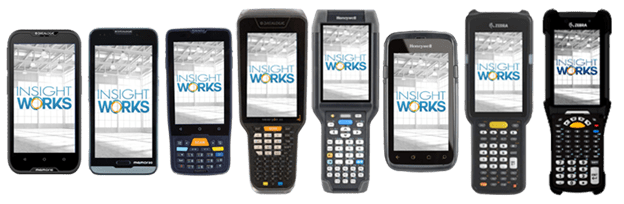
There are a lot of mobile computers on the market. The three big manufacturers are Datalogic, Honeywell (Intermec), and Zebra (Motorola & Symbol). Each manufacturer offers several different models of mobile devices, with each model available with different options.
The choices can be overwhelming, hence the purpose of this article. While you can reach out to vendors for assistance, you must do your homework and know the features you need and how the device will be used. A vendor can provide guidance, but the onus is on you to decide what will work best for you.

Why not just use a consumer-grade smartphone?
Why not wear running shoes to climb Mount Everest? Matching the proper tool to the task at hand typically yields the best results. Consumer-grade smartphones don’t use scan engines. Instead, the built-in camera is used to read barcodes. Smartphone cameras are not efficient when it comes to reading barcodes. The cameras can be slow compared to a scan engine, users typically need to be within about 12 inches to read a barcode, and reading off-axis, dirty, or damaged barcodes becomes a challenge.
Smartphones will not be as rugged as a purpose-built mobile device, and this can often end in a higher total cost of ownership when devices get damaged and need replacement.
For those that need to scan all day long, the ergonomics and scanning performance of a mobile device will out-perform a consumer-grade smartphone – hands down.
What Warehouse Management System (WMS) apps are available for mobile computers?
Just like there are lots of mobile device options, so is the selection of WMS apps. Discussing and reviewing available apps is outside the scope of this article; however, for those using Dynamics 365 Business Central, here are a couple of options to consider:
WMS Express: WMS Express from Insight Works is a free add-on for Microsoft Dynamics 365 Business Central Cloud that brings mobile device integration to the warehouse setting. This means you can save a lot of time while increasing accuracy by scanning barcodes to manage different warehouse operations. Learn more at www.WMSExpress.com.
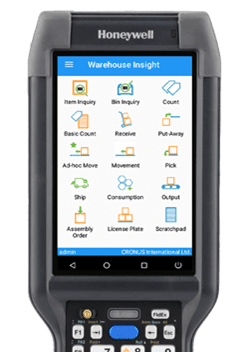
Warehouse Insight: Warehouse Insight is an add-on for Microsoft Dynamics 365 Business Central that provides warehouse and production employees full access to Dynamics 365 Business Central via barcode scanners handheld computers. Warehouse Insight streamlines inventory and warehouse functionality to provide intuitive warehousing tools for inventory counts, shipping, receiving, picks, putaways, bin management, and more. Learn more at www.WMSforDynamics.com.
Where to procure mobile devices?
Searching online for vendors of mobile computers is a good place to start. You will want to visit the Insight Works online store for those working in distribution or manufacturing and are using or considering using Microsoft Dynamics 365 Business Central. Insight Works has a direct connection with Datalogic, Honeywell, and Zebra to supply the latest selection of mobile computers. Coupled with Business Central and industry expertise, Insight Works can help ensure you get the hardware that’s right for you.
Get started and shop online today
If you have read this article, consider yourself educated when it comes to selecting a mobile device. Consider sharing this article with others. Now it’s time to go shopping. To get started, check out the device comparison table on the Insight Works’ website. The table provides a good overview of the different mobile devices that work well with Dynamics 365 Business Central.
If you have questions, please reach out to the team at Insight Works or contact BCS by calling (562) 988-3451, contacting sales@BondConsultingServices.com or by scheduling a free consultation!

Simplify Your Payment Process with the Mekorma Payment Hub Build x83 New Release
Bond Consulting Services (BCS) works with many great ISV partners to provide the best solutions and newest technology to our customers. Mekorma is one of these great ISV partners that has been simplifying payment processes for Microsoft Dynamics GP users for over two decades. Mekorma recently released the Mekorma Payment Hub Build x83 which leverages new features and functionality to optimize the experience of Enhanced ePayment customers. Now customers can easily outsource vendor payments without having to print checks in-house. Continue reading to learn more about the updated capabilities of Mekorma Payment Hub Build x83.
Enhanced Features of Mekorma Payment Hub Build x83:

- Streamlined verification process of ePayment Batches: Mekorma listened to the feedback of users and implemented a seamless process for verifying ePayment batches as part of the Mekorma Payment Hub Build x83. Users can access the Action Board’s cross-company, automated capabilities to easily verify payments with just a few clicks.
- Fewer interruptions when processing payments: To prevent users from experiencing interruptions while processing payments, the Mekorma Payment Hub Build x83 will now automatically remind you that your registration keys will soon expire if you have not yet paid your annual maintenance fee. Once the annual maintenance fee is paid, new registration keys will be automatically generated.
- Easily share important files: The Mekorma Payment Hub Build x83 enables designated users to easily analyze payment details on posted batches within the audit log. Users can also quickly export the detailed reports into Excel for streamlined collaboration and analysis.
- Multi-Factor Authentication integration: The Mekorma Payment Hub Build x83 now supports the Multi-Factor Authentication integration and email processing in Dynamics GP.
- Enhanced Signature Library: Mekorma enhanced the process of uploading and importing signature files into the Signature Library as part of the new release. Now, any signature modifications will only affect the specific company and will no longer impact other companies.
Mekorma Payment Hub Build x83 is available for download and installation as of March 15th 2021.
Mekorma Electronic Signatures for Microsoft Dynamics 365 Business Central:

Mekorma also recently launched a new add-on application for Microsoft Dynamics 365 Business Central users to quickly print payables checks with automated electronic signatures based on the check payment amount. The Mekorma Electronic Signatures application is available for free on Microsoft AppSource and it has significant time and cost-saving benefits by taking manual effort out of the payables process in Dynamics 365 Business Central. To learn more about this new application, please visit the Mekorma Electronic Signatures AppSource offer.
To learn more about the Mekorma Payment Hub Build x83, please visit the Mekorma website or contact professionalservices@mekorma.com. For more information on how BCS and Mekorma can transform your business productivity, please reach out to the BCS Team today by scheduling a free consultation!

What’s New in Dynamics 365 Customer Service!
Dynamics 365 Customer Service is Microsoft’s premier end-to-end service and support management software. Dynamics 365 Customer Service enables users to consistently deliver tailored and personalized services to customers leveraging AI insights and customer-facing solutions. Microsoft recently launched new features and capabilities for Dynamics 365 Customer Service in the 2021 Release Wave 1 which centers around Agent Productivity, Omnichannel Engagement and powerful AI Insights.
Dynamics 365 Customer Service 2021 Release Wave 1 Features:
1. Unified Routing: Dynamics 365 Customer Service is an omnichannel and intelligent routing assignment service that will assign incoming work items to the best-suited worker or queue which increases efficiencies and eliminates queue supervision and manual work distribution. Dynamics 365 Customer Service considers customer-specific criteria to automatically assign incoming service requests from all channels to the best-suited agents. For instance, Contoso Coffee, a leading manufacturer and service provider of commercial-grade coffee equipment, utilizes skills-based routing to automatically assign queues to the most available agent and diagnostics to confirm rules work as expected. Unified routing in Dynamics 365 Customer Service enables users to route cases, activities, live channels or any entity using rules based on case attributes, ML predicted fields or related entities to a queue for agents to pick which improves prioritization and offers auto-assignment based on skills. Plus, unified routing capabilities come with important diagnostics throughout which provides visibility into decision points for troubleshooting.

2. Microsoft Teams Collaboration: Dynamics 365 Customer Service empowers agents to rapidly resolve customer issues using the powerful Microsoft Teams collaborative platform. Customer Service and Teams integration enable users to access queue members, supervisors and subject matter experts who have resolved similar cases to fix issues and close deals faster. Dynamics 365 Customer Service also links Teams chats to records to preserve context and interactions with customers.

3. Federated Knowledge Search: Dynamics 365 Customer Service connects disparate database sources outside of the customer service organization to the agent’s desktop, so agents always have access to relevant information to independently resolve issues quickly. The newly integrated federated knowledge search features quickly provide agents with powerful knowledge when needed, regardless of the format or source of data. Users are also able to configure knowledge article search filters to easily access important and relevant data, saving time and expensive employee costs.

4. Native Voice Channel: Dynamics 365 Customer Service now comes with a full-featured, all-in-one contact center that blends SMS, digital messaging channels and intelligent interactive voice response to transform customer interactions. Powered by Power Virtual Agents, Dynamics 365 Customer Service native voice capabilities provide real-time voice intelligence and insights across all channels, as well as speech-based self-service and intelligent skills-based routing. Native voice channel capabilities provide many benefits by replacing fragile integrations, multi-vendor complexity, inconsistent service and disjointed analytics with an all-in-one Customer Service solution powered by the Microsoft Cloud with true omnichannel insights that connect customer journeys across all channels.


5. Embedded Analytics and Topic Clustering for Omnichannel: The 2021 Release Wave 1 for Dynamics 365 Customer Service includes new Customer Service, Knowledge Management and Omnichannel dashboards that provide detailed KPIs insights. The AI-generated data automatically organizes similar support cases and conversations into topic groups, making it easier for agents to locate important customer and service information. Dynamics 365 Customer Service now includes multilanguage support for agents with focused AI case suggestions and knowledge article suggestions.

For more information on the new features and capabilities of Dynamics 365 Customer Service, please contact our BCS Team at sales@BondConsultingServices.com or schedule a free consultation to learn more!

2021 Updates to LS Central, the Unified Commerce Software Solution!
LS Retail is a trusted partner of Bond Consulting Services (BCS) and a world-leading provider of software solutions for retailers and restaurateurs to manage complicated operational requirements. LS Retail takes pride in its vast global network of partner organizations across 140 countries that deploy the innovative software solutions and share in their commitment to lasting customer relationships.
On March 26 of 2021, LS Retail launched the newest version (17.4) of LS Central. LS Central is a fully integrated commerce ERP solution that provides you with an end-to-end view of your business operations from Point of Sale to closing deals and everything in between. LS Central version 17.4 comes with many new features and functionalities to boost your retail sales and optimize operations.
New Features of LS Central version 17.4:
1. Statement calculation and posting enhancement: To resolve potential deadlock issues, LS Retail refactored the process for replication counter updates so you can automatically create and calculate statements for stores at any time! LS Central version 17.4 also enables users to perform statements batch posting in parallel, saving time and expensive employee costs.
2. Automation of end-of-day calculations: LS Central version 17.4 enables users to automatically create and calculate statements for stores in an incremental fashion. Meaning, each calculation only includes new transactions so the calculation process can be spread throughout the entire work day, making your life much easier at the end of the business day.
3. Deployment of parallel posting: Parallel posting reduces the statement posting time dramatically by enabling batch posting with multiple sessions. Simply define in the setup how many statements you would like to post in parallel, and LS Central will automatically reference background sessions to post the parallel batches of statements. LS Retail measured the improvements in their development lab and found that six parallel posting sessions reduced the time it took to post 100 statements from 100 minutes to 58 minutes which is an astounding 42% improvement!

4. LS Central AppShell Dual Display: Users that access LS Central through LS Central AppShell (Windows version) can now access a dual display in the Terminal card to easily analyze important customer information. For instance, you can show the POS journal with the total amount to pay, or you can display advertising videos when the POS is not online.
5. POS Keyboard Shortcuts: LS Central version 17.4 enables users to trigger POS commands and button clicks via keyboard shortcuts which is very useful to speed up sales and close deals faster for the POS user.
To learn more about the new and exciting updates to LS Central, please visit the LS Retail website or schedule a free demo! To learn more about the powerful integrated capabilities of LS Retail and Dynamics 365 Business Central, please contact our BCS Team at sales@BondConsultingServices.com or call (562) 988-3451 to talk to our expert consultants!

Preconstruction Software Company Migrated from Dynamics GP to Business Central to Leverage the Microsoft Cloud
Founded in 2016, ConstructConnect provides important preconstruction software and workflow automation solutions to help plan projects before beginning to build. ConstructConnect is headquartered in Cincinnati, Ohio, but its customers can access and utilize the software from anywhere on a single, comprehensive platform. ConstructConnect also grants access to the largest network of subcontractors, making it easy to build an efficient bid process for construction projects. ConstructConnect is a leader in its field, and it enables customers to publish projects with just a single click.
ConstructConnect struggled from a lack of cloud infrastructure and lack of a requisition automation solution which made it much more difficult to automate workflows and control indirect spend. ConstructConnect decided to migrate from Dynamics GP to Dynamics 365 Business Central to take advantage of newer Dynamics 365 cloud-based technology. The ConstructConnect team began searching for the right Dynamics partner to assist with this migration and interviewed five different partners for this critical project. In October 2020, after a rigorous selection process, ConstructConnect selected BCS to manage the migration to ensure success. David Storer, ConstructConnect’s Controller, shared that “BCS was excellent through the sales process…very knowledgeable and responsive…the clear selection among five potential providers”.
With expert guidance from the BCS Team, ConstructConnect migrated from Dynamics GP to Business Central in December of 2020 including 2 companies, Financials with Dimensions, Purchasing, Banking, Fixed Assets, Financial Reporting and Power BI. The migration enabled cloud-based computing, better financial management, and company consolidation among its eight primary brands. The BCS Team also worked closely with the ConstructConnect Team to design and deploy a requisition automation solution using Power Automate.
The successful Dynamics GP to Business Central migration enabled ConstructConnect to have complete control over key financial business processes, from automated requisitions, to asset tracking, to financial reporting and dashboards. ConstructConnect currently has 12 Full Business Central Essential licenses and 100 Business Central Team Member licenses, and hopes to expand its cloud infrastructure even more in the future!
David Storer also shared “Thanks to the dedication of the BCS Team, ConstructConnect’s migration from Dynamics GP to Dynamics 365 Business Central was completed on time and under budget, and has provided huge advantages to our financial management. Our newly integrated Business Central environment supports workflow automation and control of indirect spend, and it provides intelligent, actionable insights that have helped us better define our business and financial close processes.”
To learn more about our Dynamics GP to Business Central migration offer, please visit our BCS website, schedule a free consultation or call (562) 988-3451 to talk to our expert consultants!