

Power BI and OData Updated Capabilities
By: Malika Gaona – Microsoft Dynamics Data Analyst/Business Central Consultant
In May of 2019, Bond Consulting Services (BCS) partnered with a leading wholesale home retailer and distributor to deploy Dynamics 365 Business Central to simplify business operations. The distributor sells unique products that are purchased by major department stores and retail companies throughout the U.S. including Lowes, Home Depot, Target, Walmart, and many others, through the eCommerce Sales Hub known as SellerCloud.
SellerCloud compiles all inventory, warehouse, processing, and shipping data and helps to manage multi-channel transactions for the company. The BCS Team developed a custom integration with Dynamics 365 Business Central and SellerCloud to ensure an effective and streamlined ecosystem. The BCS Team also deployed the Power BI functionality that provides powerful business dashboards and utilizes Business Central web services to analyze data and existing queries from their Business Central environment to enable faster and stable reporting.
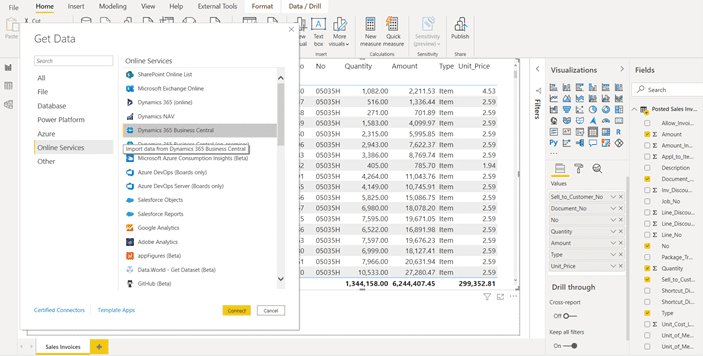
Even with the custom integrations and powerful reporting capabilities, the wholesale distributor struggled to monitor their daily sales, as they were receiving hundreds of orders, which placed a major strain on their software systems. A direct connection between Business Central and Power BI would often take hours to refresh the data and it would experience a “timeout error” which prevented the team from reviewing daily transactions. This was a major disruption for the sales and accounting teams as it was a slow and strenuous process to review detailed transactions in a given time frame.
With a recent Microsoft update, BCS was able to utilize the OData web services that allows the processing of large amounts of data in a short amount of time. OData is extremely helpful as it highlights exactly the data you need to review –no more and no less– to save time and cost:

With the OData capabilities and the efforts of the BCS Team, the distributor is now able to refresh and analyze their business data in a matter of minutes (if not less than a minute)! The leading distributor is extremely relieved and excited that their Power BI report is now working seamlessly. The company can efficiently create powerful charts and graphs to easily measure sales orders, order quantities, payments and consumption rates:
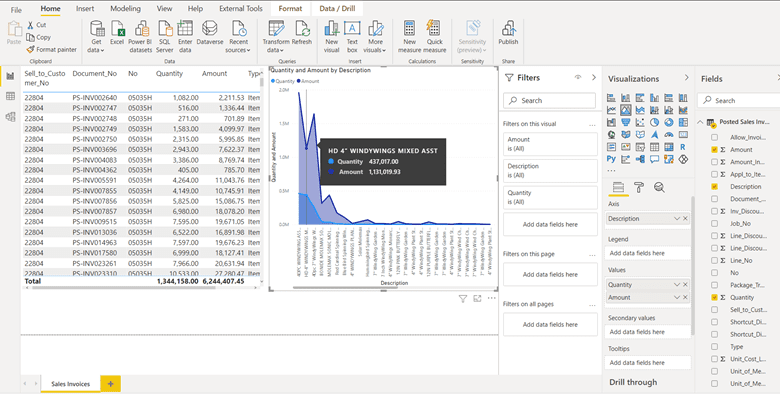
This functionality has been hugely helpful for the sales, accounting, and supply chain management teams as it provides fast and reliable data analysis to make smarter business decisions and boost performance today and long into the future.
BCS is excited to continue pushing the boundaries of business intelligence and we look forward to discovering new capabilities of Power BI and OData which are to be rolled out by Microsoft over the next few months.
To learn more, please schedule a free consultation, contact sales@BondConsultingServices.com or call (562) 988-3451 to speak to our expert consultants!

Free Warehouse Management App Available for Dynamics 365 Business Central Cloud
Here at Bond Consulting Services (BCS), we work with many great Independent Software Vendors (ISVs) in an effort to provide our customers with solutions that work for them and deliver value. Case in point: We’re excited to share with you a free app for Dynamics 365 Business Central Cloud thanks to our trusted partner, Insight Works.
The app is called WMS Express, and it represents a warehouse management system for Business Central Cloud that brings mobile device integration to the warehouse floor. Why is this such a big deal? For one, the app is free, but there are also three versions to choose from depending on your type of business. Each version is designed to help businesses streamline their warehouse or retail environment.
These versions include:
WMS Express Standard – Ideal for organizations that use purchase and sales orders but don’t utilize warehouse documents such as picks and put-aways.
WMS Express Basic Warehouse – A solid option for those who run a simple warehouse and have enabled inventory put-aways and inventory picks.
WMS Express Warehouse – A good choice for those using the warehouse document features of Dynamics 365 Business Central.
Click here for a complete comparison of the different versions available.
Key Features
WMS Express seamlessly integrates with Dynamics 365 Business Central Cloud, and configuring the app is simple, requiring less than five minutes by simply scanning a barcode; by scanning a barcode generated by a customer’s specific version of Business Central, WMS Express will actually configure itself. What’s more, both Android and Windows operating systems on mobile devices are supported, in addition to a variety of handheld devices such as mobile computers, tablets, smartphones, wearables and others.
Multi-dimensional barcodes are also supported by WMS Express (i.e. both 1D and 2D types), and for those adopting 2D data matrix barcodes, the compact size and large data capacity are definite benefits, enabling users to store more information and collect more information in a single scan.
What it all Boils Down To
Effectively, WMS Express from our partner, Insight Works, saves those working in the warehouse sector a great deal of time while increasing accuracy. This is achieved by scanning barcodes to manage different warehouse operations, so whether you run a simple operation wherein purchase and sales orders are used or run a more complex warehouse, WMS Express will help streamline processes.
Further, because it was built specifically for Business Central, WMS Express works seamlessly with your cloud implementation of Business Central, irrespective of your warehouse configuration – so, unlike bolt-on solutions, you won’t experience integration issues or need to learn a new interface.
By combining WMS Express with the warehousing management functions in Dynamics 365 Business Central Cloud, you can effectively manage the movement of inventory and more efficiently control your supply chain.
This video highlights everything Insight Works has put into WMS Express, and is a great way to begin getting your feet wet with the product.
For more information about this innovative release, visit https://www.wmsexpress.com/ or reach out to the BCS Team by calling (562) 988-3451, contacting sales@BondConsultingServices.com or by scheduling a free consultation!

America’s First Craft Brewery Relies on Dynamics GP & Horizons Manufacturing to Brew Up Their Delicious Beverages
Anchor Brewing is America’s first craft brewery that has been a pillar of the community and a staple of San Francisco heritage since 1896. Not only are their beers enjoyed by many, but Anchor Brewing is one of the last remaining breweries to produce California common beer (also referred to as Steam beer). Located on Potrero Hill in the heart of San Francisco’s seaport area, Anchor Brewing offers a wide selection of delicious beers, along with tasting sessions and public guided tours of the brewery.
Bond Consulting Services (BCS) is a fan of good beers, so BCS partnered with Anchor Brewing in 2010. BCS Team members worked quickly and efficiently to implement Dynamics GP for the brewer’s core financials. Along with the Dynamics GP platform, BCS implemented Horizons Manufacturing to ensure full process manufacturing and quality control. BCS has enhanced and supported Anchor Brewing’s Dynamics solutions for over 10 years, and we are excited to continue providing support for this great tasting historical brewery.
For more information on Dynamics GP or the BCS Team, please call (562) 988-3451 or contact support@BondConsultingServices.com!

Microsoft Dynamics 365 Business Central | 1099 2020 Form Update
By: Lupe Haro – Microsoft Dynamics ERP Consultant
For 2021, the IRS has made some changes to the 1099 forms including the new form 1099 NEC. Business Central supports the new 1099 changes and we have provided the steps below on how you can update the forms.
(NOTE: The steps below need to be ran by a user with admin permissions.)
1. In the Global Search, enter “1099 Form Boxes” and select the option in red.

2. Select Process > Update Form Boxes

(NOTE: Running the action Update Form Boxes makes reporting for 2019 impossible, since some boxes change their meaning. Make sure that you have done all of your reporting for 2019 before you update the form boxes to prepare your system for reporting for 2020.)
3. A Job Query window will open, click ok in the message

4. Change the Earliest Start Date/Time if needed and select Process > Set Status to Ready

5. Once the status is set to ready, the system at the scheduled start time will go through and update all the vendor records from MISC-07 to NEC-01 and update the 1099 form boxes. Click on the back arrow to close the window.

6. Once it completes, you can verify the 1099 form boxes and the vendor record to reflect the updates made.


The new Nonemployee compensation form can then be generated, by searching for “Vendor 1099 Nec” under the global search.

For more information on Dynamics 365 Business Central or other Microsoft solutions, visit our BCS website or call (562) 988-3451 to talk to an expert consultant today!

A Top Software Network and Services Provider Improves User Experience by Implementing Dynamics 365 Business Central
A perfect example of a quick and successful migration from QuickBooks to Dynamics 365 Business Central is Zenlayer. Zenlayer is a thriving multinational cloud services provider headquartered in Diamond Bar, California, that delivers managed hosting, colocation and networking to global data centers with distributed denial of services (DDoS) protection solutions. The main mission of Zenlayer is to help businesses improve digital user experiences both quickly and globally by providing them with the best software and cloud services available.
In September 2019, Bond Consulting Services (BCS) began working with Zenlayer to upgrade their software applications to Business Central. Given the critical and specialized functions of the company, Zenlayer required certain customizations to fulfill their operational and accounting requirements. BCS took the time to fully understand the goals of the company as well as the desires of the employees before making any changes to their existing software in order to make the transition as simple and smooth as possible. The BCS team worked tirelessly to rapidly transition Zenlayer’s software and implement Business Central within a few months. BCS also deployed Jet Reports financial reporting and Power BI for other business reports.
BCS customized Zenlayer’s Business Central solution to enable it to better track its rapid growth and expansion of its business model by reorganizing its logical Corporate Accounting structure to reflect multiple companies, captured under a newly consolidated organization. Additional specific customizations include massive imports of orders and invoices from their trading system into Business Central, implementation of a simpler Tax Rate solution, and customization of sales reports to include additional information on demand.
BCS is happy to use our extensive expertise to help you transition your software solutions and take advantage of the benefits of Dynamics 365 Business Central. For more information, please contact support@BondConsulringServices.com or schedule a free consultation.

6 Major Benefits of Microsoft Dynamics 365 Sales
As customers needs grow, sales teams experience more and more challenges when it comes to closing deals. From identifying the right prospect, to connecting that prospect with the right agent, to making the sale, your sales team needs to be in the know every step of the way.
Dynamics 365 Sales is Microsoft’s premier cloud-based CRM that is used by companies of all sizes to automate key business processes. Bond Consulting Services (BCS) is a Microsoft Gold ERP and Silver CRM Competent Partner that specializes in implementing, customizing and supporting Microsoft Dynamics solutions. BCS strongly encourages the implementation and optimization of Dynamics 365 Sales as it will empower your sales team to better understand customer needs and close deals effectively.
Major Benefits of Dynamics 365 Sales:
-
Leads Management
With Dynamics 365 Sales, your organization can store and manage leads effectively by easily identifying high-priority prospects.
-
Business Agility
Dynamics 365 Sales is a cloud-based solution which means it can be accessed from anywhere at any time. Additionally, Dynamics 365 Sales enables you to identify market trends quickly, giving you an edge over your competitors.
-
Targeting the Right Prospects
Dynamics 365 Sales will help identify the right leads, or potential customers to your business. It will provide you with real-time insights on existing customers and potential customers, and it will increase sales efficiency by targeting time and effort on leads that matter.
-
Effective Communication
With Microsoft Dynamics 365 Sales, communicating with leads and customers is made easy through useful insights and important analytics.
-
Boosting Sales Productivity
Since Dynamics 365 Sales is in the cloud, the solution offers workforce mobility and scalability. It enables your sales team to access their tools from their preferred environment through any device, which will ensure a greater lift in the overall productivity of your sales team.
Dynamics 365 Sales will encourage sales managers to accelerate their team's performance using real-time analytics based on historical data and predictive information.
-
Improved Customer Service
With integrated data analytics and user dashboards in Dynamics 365 Sales, you can align your marketing strategies with your customers' unique needs. Dynamics 365 Sales will help you build relationships and increase revenue.
Why is Microsoft Dynamics 365 Sales the Best Sales Tool?
Dynamics 365 is one of the leading Enterprise Resource Planning and Customer Relationship Management providers. Being a Microsoft product, unlike any other sales tools available in the market, you get a full range of back-office business applications. This enormous benefit means that you do not have to implement and integrate separate ERP and CRM. Dynamics 365 Sales offers great benefits, whether you are using a desktop, phone, or tablet.
There are many benefits that Dynamics 365 Sales will offer your business. It will organize your accounts and contacts, nurture your sales from beginning to end, build strong relationships with your customers, take better actions based on real-time insights and close deals faster.
For more information on Dynamics 365 Sales or how BCS can help your business, please contact sales@BondConsultingServices.com or schedule a free consultation!

One of the Largest Providers of Outsourced Oil & Gas Engineering Uses Dynamics 365 Business Central and Azure Supported by BCS
Sierra Hamilton Holdings LLC (Sierra Hamilton) is an oil and energy company that focuses on exploration and production. Sierra Hamilton is extremely successful as one of the largest providers of outsourced engineering, workforce solutions, and onsite supervision services in the oil and gas industry. Additionally, Sierra Hamilton provides important contractor solutions for drilling, well control, reservoir, and production.
Sierra Hamilton decided to shake things up in 2018 when they made the switch to Business Central to better manage their purchasing and financial accounting. Bond Consulting Services (BCS) worked closely with Sierra Hamilton to implement Business Central and to ensure that the new software application surpassed the company’s expectations. BCS also developed extensive integrations with Sierra Hamilton’s proprietary operational systems using Azure as the integration platform. BCS’ rapid and successful implementation of Business Central and Azure guaranteed that Sierra Hamilton’s exceptional team of employees would be able to tackle even the most challenging projects with ease and finesse.
Richard Jackson, Sierra Hamilton’s IT Manager shared “BCS has been a great partner to work with from system design and implementation through ongoing support. BCS continues to be very reliable and helpful as we enhance our use of Dynamics and improve our business systems.”
To learn more about Dynamics 365 Business Central and Azure, please contact sales@BondConsultingServices.com or call (562) 988-3451!

Medical Device Manufacturer Leverages the BCS Power Connector to Integrate Dynamics 365 Solutions and Automate Sales Process

In 2020, Bond Consulting Services (BCS) partnered with a medical device manufacturer that sells products and services to both patients, clinicians who service patients, and distributors of medical devices. The BCS Team implemented both Dynamics 365 Sales and Business Central solutions for the Client leveraging the BCS Power Connector for advanced integration between the two solutions. The integrated Dynamics 365 solution helped the Client facilitate a fully enabled sales process – empowering its sales team and sales process with integrations to Accounting, Inventory and Order Management functions. A description of the processes built on the Dynamics 365 Sales and Business Central platform is provided below.
Dynamics 365 Sales
The Client engaged BCS to implement a newly engineered Sales Process Flow using Dynamics 365 Sales. The D365 Sales solution uses traditional, out of the box CRM entities: Accounts, Contacts, Leads, Opportunities, Quotes, and Orders. The Sales Process Flow, as illustrated in the attached, is as follows:
-
- Information is obtained from marketing campaigns, events, or third parties and imported or entered into D365 Sales as Leads
- Leads are nurtured until qualified – which then generate associated Account and Contact data, which then can be used to develop an Opportunity
- Opportunities are advanced through three stages:
1. Develop - facilitated by the Sales team’s pursuit during which it adds user-defined “demographics” and metrics to augment the Opportunity’s “profile”
2. Propose - incorporate Product (SKUs) and Pricing data from the Client’s accounting system (QuickBooks at the outset of this initiative which was eventually replaced by a Business Central solution – also implemented by BCS) to generate corresponding Quotes and accompanying documentation
3. Close – upon receiving an approval of the Quote by the Customer
-
- Orders are generated upon successful closing of an Opportunity (a win) or upon submission from the Client’s website
- A Customer Purchase Order # is generated and is used to generate a corresponding:
-
-
-
-
-
- Invoice in Business Central
- Customer and Order in the Client’s Order Management solution
-
-
-
-
-
- Invoices generated in Business Central are sent to the Customer for payment (terms apply)
- Upon receiving payment from the Customer, the Order Fulfillment process is executed
- Upon completion of Order Fulfillment, Order Status is changed to “Fulfilled” in D365 Sales
- Order line items are updated in D365 Sales are updated to further reflect fulfillment
Dynamics 365 Business Central
The Business Central solution implemented for the Client by BCS further enables the Client’s sales process by:
-
- Maintaining inventory items and related data such as products and pricing to help populate Opportunities and Quotes facilitated by Sales
- Establishing Customer and Vendor data to help facilitate the generation of Sales Orders and Invoices
- Facilitating the Customer payments according to established terms for each Customer via its Accounts Payable module
- Driving Order Fulfillment by providing the required product information (ex: serial #, product, etc)
Accurate timely execution of Sales was facilitated by an effective integration between Dynamics 365 Sales and Business Central using BCS Power Connector, which is a powerful and extensible integration build with Microsoft Power Automate.
In addition to enhancing the Sales and Order Management processes, Business Central also provides much more robust Accounting features than their prior QuickBooks solution, which helped the Client to facilitate the:
-
- Accurate and timely recording of all transactions via a newly-defined Chart of Accounts, General Ledger with supporting Dimensions to satisfy organizational structure, bookkeeping, regulatory and tax reporting requirements
- Carrying forward of balances and execution of 2020 transactions to provide an effective starting point from which accurate recording of operations as of the cut-over date were able to commence
- Generation of financial reporting for the Client’s Executive Leadership – Board Members, Owners, CTO, and CFO
The deployed Dynamics 365 – Business Central integrated solution significantly enhanced sales enablement and accounting processing for the Client. Additional initiatives are in progress for the Client related to Customer Service. The BCS Team is leveraging the Dynamics 365 Customer Service Hub to provide an intelligent Service Management function in support of the Client’s warranty and augmented support plans, as well as augmented Marketing Campaigns via an integration between Dynamics 365 Sales and MailChimp to provide more intelligence on the success of customer outreach as a precursor to the Sales Process Flow.
BCS may also be engaged to leverage integrations between Business Central and tightly integrated third-party software to help augment the Client’s Manufacturing, Warehouse Management, Advanced Inventory, Production Scheduling, and Quality Control functions to further enhance the automation of their overall operations.
Please contact support@BondConsultingServices.com or call (562) 988-3451 for additional information on this success story and how BCS may assist your organization!

When to Migrate from Dynamics AX to Dynamics 365
If you are using Dynamics AX, the thought of migrating to Dynamics 365 has most likely crossed your mind. Although the new features, easy scalability, and added intelligence are enticing, the obstacles of data migration and disruption of business continuity may persuade you from migrating. As specialists in enabling organizations to seamlessly migrate from older versions of Dynamics to the all-new cloud version, we can assure you that we will migrate your data quickly, successfully, and without impacting your business continuity.
In today’s blog, we will discuss when an organization should decide to execute the migration. This topic is important as it will ensure that your business migrates to the cloud at the perfect time!
When should you upgrade from Dynamics AX to Dynamics 365?
Upgrading to Dynamics 365 will facilitate revenue generation and will save you tons in the long-term. If you are unsure if your business is ready for an upgrade from Dynamics AX to Dynamics 365, make sure to review the following considerations:
You need an upgrade from Dynamics AX to Dynamics 365 when –
1. You require more licenses.
Expanding your workforce also means increasing your end-users. This increase in end-users is reflected by the increased number of required licenses. When using Dynamics AX, you need to pay the license fee plus annual support maintenance. Rather than purchasing new licenses, upgrade your business to Dynamics 365. By upgrading to Dynamics 365, you will reduce your expenditures and save more.
2. You are anticipating growth.
Your existing ERP needs an upgrade as your business initiatives evolve. Are you an organization currently thinking about or in the process of adding more strength to your workforce? If yes, our expert team highly suggests a technology upgrade. Your ERP should be just as agile and scalable as your team to keep up with your company’s growth.
3. You are adding business processes.
As and when your business grows, the need to add new business processes or adjust existing processes to accompany the growth becomes extremely apparent. This also means that your existing ERP should be able to facilitate the new addition or the change in the processes. When your organization is adding or changing its business processes, an upgrade from Dynamics AX to 365 is highly recommended as integrative and embedded functions are more readily available in Dynamics 365.
Dynamics 365 is a multi-tenant suite of applications that fulfills your needs and prioritizes your customers above everything. To ensure that your Dynamics 365 investment is a success, you will need a Microsoft Dynamics Partner to guide you through the process. At Bond Consulting Services, we provide expert consultation for your Dynamics 365 implementation, customization, integration, development, and maintenance support. For more information on Dynamics 365, visit our website or contact our Team!

Private Equity Firm Relies on Dynamics 365 Sales and Dynamics GP to Manage Important Investments and Client Relations
MainLine Investment Partners (MLIP) is a successful private equity firm that was first founded in 2011. The company is headquartered in Wynnewood, Pennsylvania, but it provides investment advice and portfolio management services to high-growth companies throughout the U.S. MLIP focuses on investing in real estate assets, private wealth management firms, multifamily residential property management, and other operating businesses. MLIP is a leader in its field as the company has over 70 years of experience and is currently responsible for managing $1 billion of invested capital and assets.
Bond Consulting Services (BCS) first partnered with MLIP in 2015 to deploy Dynamics 365 Sales to manage investor communications and reporting. The BCS Team helped to integrate Dynamics 365 Sales with Dynamics GP and other operational systems, enabling a collaborative sharing of data with MLIP, its partners and clients. The solution included extensive custom reports for investment management and clients, including Power BI for dashboard views of key information for management. MLIP uses Dynamics 365 Sales to track all client communications, enhancing its trusted relationships and ability to deliver value. The efficient and successful deployment of Dynamics 365 Sales integrated with Dynamics GP has been instrumental in enabling growth in its portfolio and client base, while maintaining excellent client satisfaction.
For over 5 years, MainLine Investment Partners has trusted BCS as their business systems advisor and partner. Bond Consulting Services looks forward to providing continued support and excellent customer service to MLIP for many more years to come.
For more information on the benefits of Dynamics 365 and Dynamics GP, email support@BondConsultingServices.com or schedule a free consultation!