

How-To Add a User in Microsoft Dynamics GP
Setting up a new user requires you to use the ‘SA’ login, so please verify that you have these credentials beforehand. Use the following steps to create and setup a new user in Dynamics GP 2018. There are two options for performing these tasks:
Option 1 – Copy settings from an existing user
Within Dynamics GP, navigate to the following window:
Microsoft Dynamics GP >> Tools >> Setup >> System >> User

Enter the User ID to be used (in some cases, the person’s first name is used; in other cases, a person’s first initial and last name may be used). Also, enter the User’s Dynamics GP password, which you will assign.

(leave the Status as ‘Active’ and the User Type as ‘Full’)
Mark the ‘Enforce Password Policy’ checkbox if you intend on having the Dynamics GP/ SQL Server system enforce a password length/strength and password expiration based on the network policies.
Click on ‘Copy Settings’

You will be asked if you want to save the changes for this user ID, and you will want to click ‘Yes.’

Within the Copy User Settings window, look up and select the User that you will be using as a model by clicking on the magnifying glass icon and selecting a user within the ‘Copy From’ section.

Click the OK button at the top of the screen to initiate the copy process.
Once the setup is complete, the window Copy User Settings window will close. You should be able to have the User login from this point forward.
Option 2 – Setup the User manually
This next option has 3 steps; they are as follows:
- Add the username/password
- Give the user access to one or more companies
- Set the User’s security role in each company they access.
STEP ONE:
Within Dynamics GP, navigate to the following window:
Microsoft Dynamics GP >> Tools >> Setup >> System >> User

Enter the User ID to be used (in some cases, the person’s first name is used; in other cases, a person’s first initial and last name may be used). Also, enter the User’s Dynamics GP password, which you will assign.
Leave the Status as ‘Active’ and the User Type as ‘Full.’
Save the user record.
STEP TWO:
Navigate to Microsoft Dynamics GP >> Tools >> Setup >> System >> User Access

Highlight the User on the left and click the box for each company to give the user login rights for that company.
STEP THREE:
Navigate to Microsoft Dynamics GP >> Tools >> Setup >> System >> User Security

Select the User and Company at the top of the screen
Click the box for each security role the User will perform. For details on the role’s tasks, use the Security Roles window on the SetupàSystem menu to see the tasks for the role. Use the Security Tasks window to see the specific details a task can perform.
**NOTE: Roles with an asterisk (*) at the end are provided “out-of-the-box.” We suggest that if the roles are to be modified, a copy is created, and the copy is modified for use. The Copy function is in the Security Role Setup screen mentioned above. If Tasks need to be added, they can be created in the Security Tasks screen mentioned above and then added to the copied role.**
Assign the User to an Alternate/Modified Forms and Reports profile. These profiles determine which modified windows and reports the User will be able to access. They must have rights to the original reports before they can be assigned to a modified version. Reporting access is defined within the security role.
Save your changes. You should be able to have the User login from this point forward.


Spotlight: The Newest Features in Microsoft Dynamics 365 Business Central (BC)
Microsoft Dynamics 365 Business Central (BC) is a comprehensive business application solution designed and optimized for small and mid-sized organizations. Here at Bond Consulting Services, we can attest to the fact that since its launch in April 2018, Business Central has seen increasing adoption by companies that want to transform their businesses digitally.
New features for BC are regularly released throughout the year in scheduled waves. For 2020 release wave 1, Business Central investments center on service fundamentals to meet the demands of a rapidly growing customer base, enhanced user productivity, geographic expansion, and top customer-requested features.
We have summarized some of the key new features below. Or, if you prefer, you can watch this 12-minute video for an overview of Business Central 2020 release wave 1:
The following is a partial list of new features that generally became available (GA) on April 1. You can click and drill down on for a detailed description of each enhancement.
- Extend ListPlus pages previously based on the Date virtual table
- Extend Price Calculation
- Auto-insert recurring sales and purchase lines
- Enhanced customer and vendor document layout
- Manage direct-debit collections in Service Management
- Notify requester about all changes for an approval request
- Print to attachment
- Productivity improvements in permissions management
Need help? Need more information?
Here’s how to contact Bond. Visit us at www.BondConsultingServices.com or just pick up the phone and call 562-988-3451.
Related Post
Spotlight: The Newest Features in Microsoft Dynamics 365 for Finance and Operations

Troubleshooting Dynamics GP Window Scaling Issues on High Resolution Displays
Article by: George Rios – Senior Microsoft Dynamics GP Consultant
If you are having issues with your Dynamics GP windows appearing too small or too large on one or more monitors, one quick fix to try would be the following:
Closeout of Dynamics GP.
Click on the Dynamics GP icon (from the desktop or taskbar) and select Properties.
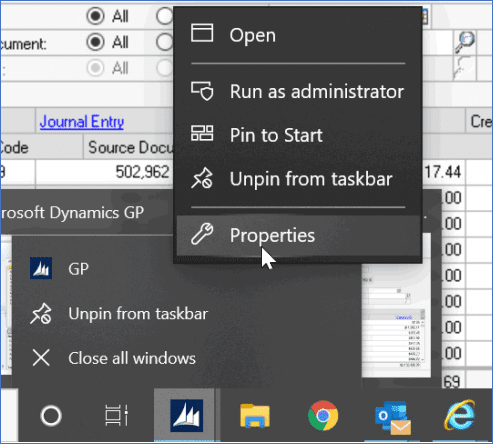
Within the GP Properties window, click on the Compatibility tab.

Within the Compatibility tab, click on the ‘Change high DPI settings’ button and then mark the checkbox to ‘Override high DPI scaling behavior’ within the additional GP Properties window that appears. In addition, select the ‘System’ option from the drop-down menu before clicking the ‘OK’ button on that same window.

Within the main GP Properties window, click the ‘Apply’ button.
Click the ‘OK’ button to close the main GP Properties window.
And finally, launch Microsoft Dynamics GP and log in to verify that the transaction/ inquiry windows are displaying as expected.

Spotlight: The Newest Features in Microsoft Dynamics 365 for Finance and Operations
Microsoft is not immune to the coronavirus any more than you and me. But that didn't stop or even delay the scheduled Spring 2020 release of new features in Microsoft Dynamics 365 for Finance and Operations. Let's take a look at just a dozen key updates.
Microsoft Dynamics 365 Finance Updates
- You can now generate the Treasurer's report on a daily basis to review the activity in selected accounts for the Treasurer's fund and compare that to the equity activity in other funds.
- If your agency has sent a request for quotation (RFQ), vendors might have questions. The vendors can now ask questions and receive answers through the Vendor collaboration feature.
- Credit management will proactively suggest credit control activities, thereby improving cash flow, reducing bad debts, and providing insight and controls that help you manage credit risks.
Microsoft Dynamics 365 Supply Chain Management Updates
- Due to enhancements for the use of existing catch weight tags with warehouse management, you can now use a mobile device to report a production order as finished.
- Over receipt of load quantities now lets you choose whether to allow or prevent over receipt of inbound load quantities.
- When printing a license plate label, you can now control the date format and print special characters belonging to many different languages.
Microsoft Dynamics 365 Commerce Updates
- Azure Active Directory (Azure AD) support for POS sign-in is now available.
- Change Mode of Delivery can now be added to a point of sale (POS) screen layout.
- Cashiers can email a receipt for a previous transaction to a customer from the Journal.
Microsoft Dynamics 365 Human Resources Updates
- New Performance Management entities are now available in the Data Management Framework (DMF).
- Comments on leave requests now allow more than 100 characters.
- User-defined links are now enabled on the streamlined Worker
The Tip of the Iceberg
The above are just the tip of the iceberg. We chose only 3 in each category, but there is much more. Additionally, there are many new platform updates and lifecycle services releases. And, there are also scores of new features that have been released for Microsoft Dynamics 365 Business Central. To find out more…
Contact Bond
Visit us at www.BondConsultingServices.com or just pick up the phone and call 562-988-3451.
Related Post
ERP Upgrade? New ERP? This could be the ideal time…

This checkbook is being reconciled by another user error in Dynamics GP
We recently had a customer inquire about how they could determine which user was currently locking their bank reconciliation window. After taking a step back and contemplating our approach, we realized that the lock record is found within the tempdb database.
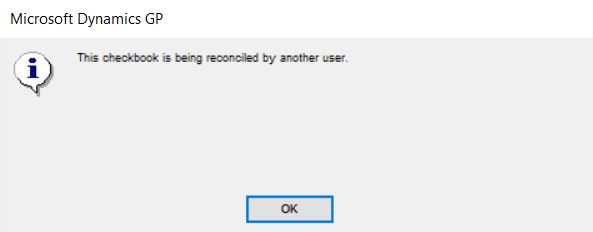
A simple query would be needed to get this information:
SELECT A.USERID, L.* FROM tempdb.dbo.DEX_LOCK L, DYNAMICS.dbo.ACTIVITY A
WHERE L.session_id = A.SQLSESID
AND table_path_name like '%CM20500'
And knowing which tables are affected helps expedite the search.
In theory, this same query (referencing a different table) can be used when you encounter similar situations in Microsoft Dynamics GP.
Visit us at www.BondConsultingServices.com or just pick up the phone and call 562.988.3451. For any other Microsoft Dynamics 365 inquires – support@BondConsultingServices.com

Office 365 Is Now Microsoft 365: New Name, More Benefits, Same Price
When you go to the Bond Consulting Services (BCS) website, the first headline you will see is:
WE DO DYNAMICS
And we do! In fact, we do all the following:
Microsoft Dynamics GP
Microsoft Dynamics 365, and
Microsoft Dynamics 365 Business Central
But, as a matter of fact, we do a lot more than that, too. And one of the many other applications we specialize in is Microsoft Office 365, which in common parlance is known as O365.
Breaking News!
Office 365 is now Microsoft 365 (aka M365), which, under its new name, offers our clients more benefits than had with Office 365, at the same price. This news is so recent that we have not even had a chance to make that change on our website. But we wanted to bring this news and some of the details surrounding the change to you, our clients, our prospective clients, and all our blog readers.
Here is the skinny.
Microsoft 365 includes everything you enjoy in Office 365, like premium Office apps, and 1 TB of cloud storage (that means 1 trillion bytes!), plus new subscription benefits. Here are half a dozen:
- Smart assistance features deliver helpful design and writing suggestions to polish your work in Word, Excel, and PowerPoint.
- Premium templates that bring your ideas to life with access to our growing collection of templates, stock photos, fonts, and icons.
- OneDrive Personal Vault which adds another layer of verification for important files and photos, like passport scans.
- OneDrive PC folder backup, which automatically backs up your folders on your Windows PC, keeping your files safe and easy to transfer to another PC.
- Money in Excel (coming soon) which allows you to import your financial transactions into Excel so you can view, organize, and get personalized insights on your finances in one place.
- Microsoft Editor, which you can download from Chrome or Edge. It allows you to write more clearly and accurately across the web, including on most social media sites, with your intelligent writing assistant.
Ready to learn more?
Visit us at www.BondConsultingServices.com or just pick up the phone and call 562-988-3451.
Related Post:
Microsoft Office 365 Is More than Just Microsoft Office!

ERP Upgrade? New ERP? This could be the ideal time…
The impact of COVID-19 on American business and the U.S. economy has yet to be determined. What we do know is that many companies have shut down completely, laying off millions of employees. Some will reopen, some will not.
Many other businesses, like ours, have shifted into full remote mode. We recognize that some companies are better prepared to do that than others. But with the right ERP solution that allows access anytime from anywhere on any device, companies can remain viable during these troubling times.
Here’s how Bond Consulting Services (BCS) can help.
ERP Upgrade
If, for example, you are running an older version of Microsoft Dynamics GP, this could be an excellent time to upgrade to the newest release and set up remote access to your ERP so that all of your employees who need access will have access – anytime, from anywhere, on any device (and that includes from their smartphones). The upgrade can be executed remotely, and your company will able to continue its operations remotely and seamlessly.
You may even realize that the long-term value of a remote workforce.
New ERP
The other option that you may want to consider at this time is the implementation of a new ERP system. Why? Because the newer ERP solutions tend to be cloud-based, and because of that, they’re more remote-friendly. In other words, it’s easier for employees working from home to access ERP cloud systems. It’s that simple.
What’s why this is an excellent time to consider implementing either Microsoft Dynamics 365, which is an enterprise system or Microsoft Dynamics 365 Business Central is a mid-market solution.
3 Ways to Get Started
If you’d prefer to do more research on your own, look at the Dynamics 365 implementation packages that Bond offers. 4 Business Central packages range in price from $500 to $18,000 - depending on a variety of factors that are outlined in the description of each package.
Do It Now!
Visit us at www.BondConsultingServices.com or just pick up the phone and call 562-988-3451.
Related Article
When It’s Time to Turn QuickBooks Off, It’s Time to Turn Microsoft Dynamics On

Microsoft Office 365 Is More than Just Microsoft Office!
When we think about the essential Microsoft Office Suite, most of us believe mailboxes, email, calendars, and tasks. But Microsoft Office 365 (O365) is SO much more. Yes, it includes the full Office suite that you know so well. But it also brings you the tools you need to collaborate and get more done, anytime, anywhere. Take a look:
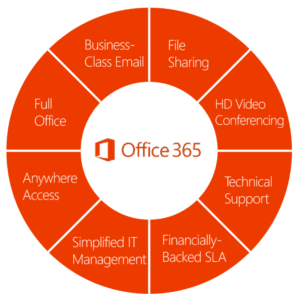
Did you know that with Office 365, you also get…
- Skype for Business, which offers unlimited online and video conferencing meetings with up to 250 people and voice calls and text-chats with the simple click of a button, so you can instantly connect with employees and customers.
- SharePoint, which is a mobile, intelligent intranet. SharePoint provides enterprise-grade, back-end infrastructure management to streamline business processes. With SharePoint, you can share and manage content and apps, thereby boosting productivity and collaboration across your entire organization.
- OneDrive for Business, a cloud-based application for data storage that lets you collaborate and share documents on the go or in your office.
Plus…
- A financially-backed Service Level Agreement (SLA)
- Technical support
- HD video conferencing
Take the next step
Click here to get a quote. Click here to schedule a demo. Of course, you can always visit us at www.BondConsultingServices.com or call 562-988-3451.
Related Posts
Visit the BCS Blog for scores of articles about the Microsoft products and services that Bond delivers

Celebrating 20 Years as a Microsoft Dynamics Partner
We wish that we could celebrate our 20th anniversary as a Microsoft Dynamics partner in a big way. With a lavish party that might include a brass band, champagne, even fireworks. We wish we could invite all of you to join us. But that’s impossible given the current edicts regarding “social distancing.”
What does our 20th anniversary mean for all of us here at Bond Consulting Services (BCS)? It’s a time for reflection, for looking back at how far we’ve come in the last 20 years, what we’ve accomplished, how much has changed, how we’ve grown, and how we’ve served our clients.
It started 20 years ago with Microsoft Dynamics GP
We built our business from the ground up as a Microsoft Dynamics GP partner. Remember this: When Bond Consulting opened its doors in the year 2000, “GP” stood for Great Plains, which was then the most popular accounting software package on the market. It was not until the following year, 2001, that Great Plains was purchased by Microsoft.
We loved GP then and still love it now for all the best reasons, which boil down to this: GP is a horizontal, midmarket user-friendly ERP software solution.
Then, along came Microsoft Dynamics 365 in several iterations
It was not until 2016 that Microsoft Dynamics 365, a cloud-native ERP, was launched. Realizing the many benefits of cloud ERP, Bond Consulting jumped on that bandwagon in a big way. It’s only been 4 years, but Bond now offers all the major iterations of Dynamics 365. These include:
- Microsoft Dynamics 365 Business Central
- Dynamics 365 for Sales
- Dynamics 365 for Customer Service
- Dynamics 365 for Marketing
- Dynamics 365 for Field Service
- Dynamics 365 for Project Service Automation
- Dynamics 365 for Retail
- Dynamics 365 for Talent
As a native cloud ERP, Microsoft Dynamics 365 met the needs of new Bond clients who preferred being in the cloud to managing an on-premise ERP solution. Dynamics 365 was also a natural progression for any Dynamics GP clients who were ready to move to the cloud.
You have options with Bond: Microsoft Dynamics GP and Microsoft Dynamics 365
We love both. We recognize the many benefits of both. And we will continue to implement and support both. At Bond, you get to choose what’s right for you. In all cases, you will be part of Bond’s Microsoft Dynamics family. Regardless of when you joined Bond, we hope you’ll join us in celebrating our 20th-anniversary milestone.
Visit us at www.BondConsultingServices.com or just pick up the phone and call 562-988-3451.
Related Post
Why Choose Bond Consulting Services to Implement your Microsoft Dynamics ERP

Fixing the The General Posting Setup Does Not Exist Error Message in Business Central
We have come across an issue where you receive the following error message, “The General Posting Setup does not exist. Identification fields and values: Gen. Bus. Posting Group='DOMESTIC',Gen. Prod. Posting Group='' when trying to correct a purchase invoice in Business Central.

This is a known issue that Microsoft is in the process of fixing, but please find the steps below on the current workaround.
In the Purchase Credit Memo window, click “+New” to create a new Purchase Credit Memo.


Select or enter the Vendor No. that you need to correct or cancel the invoice for.
Select Actions > Functions > Get Posted Document Lines to Reverse… and grab the line or lines that you need to reverse.


The lines will automatically be added to the Purchase Credit Memo

To post the Purchase Credit Memo. Select Posting > Post

If necessary, enter and post a new (corrected) Purchase Invoice.