

December Updates | Finance and Operations, Business edition
Microsoft announces the latest updates to Dynamics 365 for Finance and Operations, Business edition, including personalization of the workspace, improvements of global dimensions and assembly management.
Personalize your workspace
You can now change the User Interface for individual users to achieve a better fit to each user’s tasks and preferences—thereby increasing productivity and user satisfaction. You can customize by moving, hiding, or showing specific fields or columns on a page, by freezing columns to keep them visible as you scroll horizontally, and by moving or hiding cues or parts. All personalization can be cleared from a page easily to get a fresh start.

Change Global Dimensions Improvements
It is now easier to make changes to your Global Dimensions as your reporting and analysis needs change. In the background changes to Global Dimensions now run as a set of smaller transactions rather than as one huge transaction that would typically run overnight and roll back in case there are any errors.
You can make changes to your Global Dimensions in the Suite Experience by going to Setup & Extensions, choosing Manual Setup, then Finance, and then General Ledger, and finally clicking Change Global Dimensions in the ribbon.
Assembly Management
You can now use Assembly Management features for warehouse processes, making it simpler to manage your inventory. Assembly Management is useful when you have business processes that turn products and resources into new finished products.
Go to the Replenishment header any Item Card in the Suite Experience to set up Assembly Management for that item. You can set up the Bill of Materials for an item using the button in the ribbon on the Item Card.
Source: Dynamics Community


Access Multiple Microsoft Tenants with Chrome Personas
Consultants need to access multiple Microsoft tenants in Office 365. From client tenants, to development and even their own internal intranet, it can become a daunting task to remember each individual log-in and then remember to sign-out each time so you don’t accidentally log-in to the wrong tenant during a live client demo.
To create a new person, navigate to the top, right corner of the Chrome Browser Window.

Click the Person 1. Click on the last link to “Manage People”

Click the link to “Add Person”

Type in the Name for Persona, select an icon and click “Save”

When you open a browser window, your new persona will show in the upper right-hand corner

To start saving your log-in for a specific Office 365 account, enter portal.office.com in the url window.
Do this for each client you need to access and it even creates shortcuts on your desktop.
Enter in the log-in credentials you want to use for that specific persona. The credentials will save according to that persona. Each time you switch to a different persona, the credential for that persona will be the ones that will automatically show. No more needing to log-in and out of manage multiple Incognito windows.
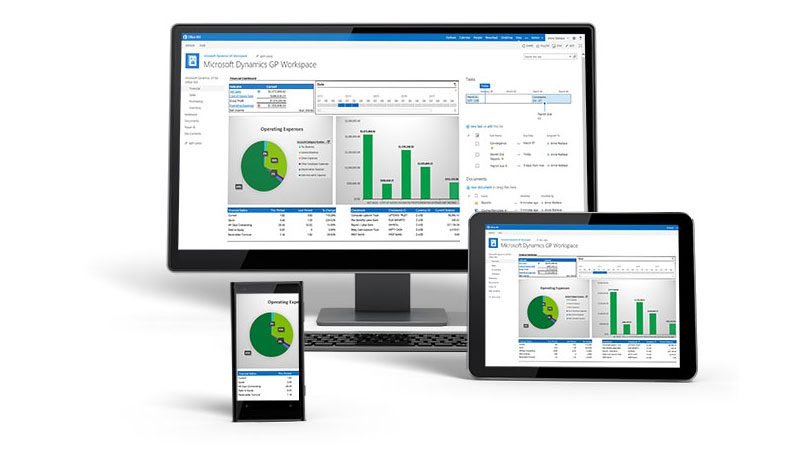
News | Microsoft Dynamics GP 2018 Released December 1
Dynamics GP 2018 is released!
Moving forward, new versions of Microsoft Dynamics GP will now be released annually in December with plans to incorporate features requested by GP users and partners. Currently Microsoft’s focus is improving on the existing features, per user and partner requests. In fact, over half of the new features included in GP 2018 came from user suggestions. To share your suggestions, head to https://connect.microsoft.com/. This will be more and more important as future releases are planned. If there’s something you think Dynamics GP should do, but doesn’t, send in your suggestions!
As for Dynamics GP 2018, get ready to see improvements in the following areas:
- Optimize Financials/HRP with more features
- Comprehensive Doc Attach
- Power “Suite” Evolution
- User Experience-everything and anything a user wants to make their job easier
- Workflow 3.0
Microsoft doesn’t recommend upgrading your system until the first service pack has been released. Additionally, if you have add-on products or ISVs, you’ll need to make sure they’re compatible with the new release before you upgrade.
Contact us and we can help!

#GP2018 Feature of the Day | Web Client
Microsoft Dynamics GP 2018 features a few changes to Web Client, making it more user-friendly.
Improved functionality includes:
- Ability to have fields autocomplete in the Web Client, as they do in the Desktop Client

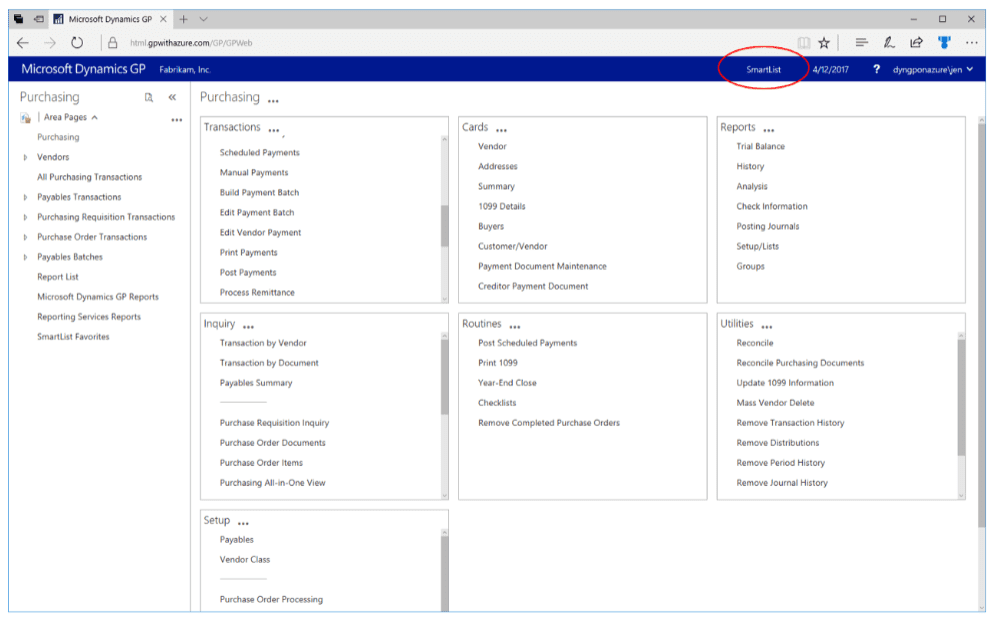
- Added the shortcut to banner for SmartList for quicker navigation. Users who have access to the SmartList window will see it, those who do not have security will not see the shortcut
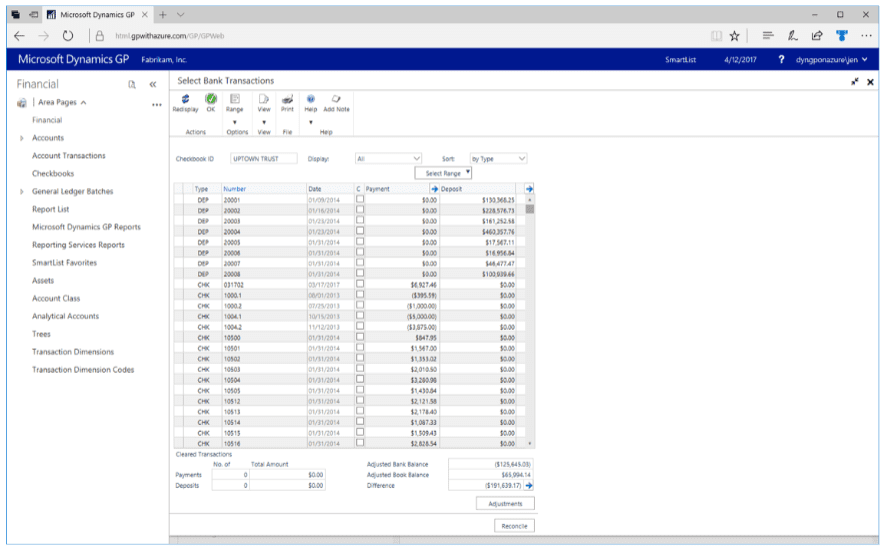
- Ability to maximize the Bank Reconciliation window so the user doing a reconcile can see more transactions within the window, reducing the amount of scrolling needed to find transactions
Find out more on Pam Misialek’s #GP2018 Feature of the Day Blog Series here.

#GP2018 Feature of the Day | Sorting
Many of the features in Dynamics GP 2018 came from the user community through www.connect.microsoft.com.
New sorting options have been added to the following windows:
- Add sort to Receivables Transaction Inquiry - by Customer
- Add sort to Receivables Transaction Inquiry - by Document
- Added the ability to sort by Type, Document Number, Document Amount, Amount Remaining and Document Date in both Ascending and Descending Order for both Receivables Inquiry windows.

- Add sort to Payables Transaction Inquiry - by Vendor
- Add sort to Payables Transaction Inquiry - by Transaction
- Added the ability to sort by Document Number, Type, Original Amount, Unapplied Amount and Document Date in both Ascending and Descending Order for both Payables Inquiry windows.

- Additional Sorting in Bank Reconciliation Window
- Within the Bank Reconciliation window, the user will have more options to sort the window so it is easier to find transactions during the reconciliation process. Microsoft is adding Amount (Payment and Deposit).

Find out more on Pam Misialek’s #GP2018 Feature of the Day Blog Series here.

Adding a field in Power BI Desktop
Power BI is a comprehensive collection of services and tools that you use to visualize your business data. Content packs are available that make it easy to visualize and analyze the Dynamics 365 data with Power BI based on a standard data model. The content packs are built with a set of Dynamics 365 entities and fields that are useful for most sales, service, or marketing reporting scenarios.
Add a custom field to a report
The following procedure describes how to add a custom field that is a date, string, or number to a report for all available entities except the Account entity.
- In Power BI Desktop, click Edit Queries.
- In the left navigation pane of the Query Editor, under Queries, click the query that has the custom field that you want to make available for reports, such as the Opportunityentity query.
- In the right pane, under APPLIED STEPS, click the settings button next to Removed Other Columns.
- The Choose Columns list shows all fields for the entity, including custom fields. Select the custom field that you want, and then click OK. The entity query is updated and a column is added in the entity table for the custom field that you selected.
- In the right pane, under APPLIED STEPS, click Lang – Renamed Columnsand then click Advanced Editor to add the mapping for the field to the entity query. For example, if the custom field name for the Opportunity entity is int forecast and the display name is Forecast, the entry should appear like this.
- After you add your field mapping, make sure there are no syntax errors displayed at the bottom of the Advanced Editor. Also, make sure the field name appears exactly as it appears in the column heading, including the correct letter case. If no syntax or table errors are detected, click Done.
- Click Close & Apply in the Query Editor.
The custom field is now available in the right pane under Fields for the entity, and can be added to new or existing reports.

Microsoft Dubbed Leader in Sales Force Automation
Gartner has positioned Microsoft in the Leaders Quadrant in the 2017 Magic Quadrant for Sales Force Automation.
According to the report, the sales force automation market grew 12.8% in 2016, to $5.6 billion. SFA vendors have made a significant move toward embedded predictive analytics.
By 2020, 30% of all B2B companies will employ artificial intelligence to augment at least one of their primary sales processes.
Sales force automation (SFA) applications automate the sales activities, processes and administrative responsibilities for an organization's sales professionals. SFA is a foundational technology that provides core sales execution capabilities: account, contact and opportunity management, sales forecasting, reports and dashboards, and mobile applications.
Gartner's evaluation places Microsoft in the Leaders quadrant again this year with Microsoft Dynamics 365 for Sales. Microsoft has a deep understanding of the market, supported by a consistent marketing strategy and market responsiveness. It has improved its overall sales approach by addressing not only CIOs and other IT leaders, but also sales executives. Microsoft continues to increase its SFA customer base, and has demonstrated that it is selling to larger sales organizations than it has in the past. During the past year, Microsoft added the Dynamics CRM product to the Dynamics 365 product suite, aligning it with its ERP offering and the Azure technology platform. The Microsoft Dynamics 365 for Sales product is available as SaaS or on-premises, but prospective customers should note that the on-premises version is updated only once a year, whereas the SaaS version is updated twice a year. Microsoft has several relevant capabilities on its product roadmap. These include new machine-learning capabilities for automated customer insights based on psychographic insights, and improved portal capabilities.
Highlighted Strengths:
- Customization: Microsoft's strength lies in its ability to create custom sales processes. Microsoft's reference customers gave it very high scores for the ability to customize its application with custom fields, custom objects, workflows and a customized user interface, which includes the ability to customize the user interface for desktop users.
- Customer experience: Several reference customers noted that Microsoft has improved the quality of its customer engagement processes. They highlighted the quality of its post-sales support and presales advisory services.
- Product strategy: The Microsoft Dynamics value proposition includes integrated Microsoft Exchange, Office 365 and SharePoint capabilities, as well as an expanding set of Azure products, such as Azure Machine Learning, Azure Data Factory, Azure Data Lake and Power BI. Gartner clients have reported positively on this integrated product offering during inquiry calls with Gartner. Microsoft has also defined an effective product vision for how predictive analytics can support better sales execution.

November Updates | Finance and Operations, Business edition
Microsoft announces the latest updates to Dynamics 365 for Finance and Operations, Business edition, including Cost Accounting, Prepayments, Accountant Hub and more!
Cost Accounting
Using Cost Accounting will help in gaining a better understanding of the cost of doing business – analyzing what types of costs are incurred, where costs occur, and who bears the costs. Allocate actual and budgeted costs to operations, departments, products, or projects to analyze the profitability of each entity within your company.
Cost Accounting can be set up under “Setup & Extensions”. Once set up, the module is available in the Accountant Role Center or by using search.

Prepayments
Prepayments can give you peace of mind by letting you invoice and collect deposits required from customers, or remit deposits to vendors, so you can be sure that all payments are posted against an invoice.
You can define prepayment requirements for a customer or vendor for all items, or only selected items.

Dynamics 365 Accountant Hub
Accountant Hub is available in public preview. With this update the Accountant Hub for Dynamics 365 for Finance and Operations, Business edition is available in public preview. The Accountant Hub enables Accountants to easily access their clients’ data, effectively manage accounting processes and tasks, and to enhance financial insights.

Alternative Order Address
Purchase Orders not support Alternative Order Addresses, meaning that purchasers can now choose from four different address options when placing a purchase order. The default option is to automatically fill the ship-to fields with the company address or customer address in case of sell-to-customer orders. Choosing location address lets the purchaser choose from a list of company locations. The Customer Address option automatically fills the fields with the customer address for drop shipments. Finally, the purchaser can choose a custom address for one-off shipments.

Microsoft Flow
Flows can now be managed from different environments within Dynamics 365. On the ‘Manage Flows’ page you will now find a list of environments from Microsoft Flow that you have access to. Once a selection is made it will be remembered until a new environment is chosen. Users can also define which Microsoft Flow environment they want to display and manage within Dynamics 365, providing flexibility to work with different environments (for example a test and a production environment).

User Tasks
The Accountant Hub now supports User Tasks, so accountants have an overview of all assigned tasks from all companies – including visual indications for overdue tasks. The company details page now shows cues for pending tasks and allows you to drill back to those tasks from the page.


My Summit Rewind | David Gersten
Before heading to a conference, it is important that you ask yourself why you’re attending the event. At the recent User Group Summits in Nashville, all attendees were there for many different reasons.
MVPs, or Most Valuable Professionals, attended to share their industry knowledge and expertise to thousands of customers and partners. Many customers attend Summit to learn more about the Microsoft solutions they utilize within their organization.
Customers have the opportunity to walk through hundreds of booths to identify new ways of making their solutions work better for them.
Each year Summit sponsors attend the conference to pitch their solutions to new customers that may want to buy it and to partners that may want to sell it.
So where does Bond Consulting Services fit in? Why did we attend Summit?
We represent all the solutions presented at the user group summits. AX, GP, NAV, CRM and Dynamics365…we sell, implement and market them all. With only two people from BCS at the conference, attending all of the hundreds of sessions was nearly impossible.
However, we were able to attend many important sessions including the GP, AX and NAV General Sessions, the Partner Exchange, the Marketing Alliance kick off, The Partner Connection Portal presentation and the Outlook for CRM tips session. This and many other sessions we attended aligned with our main purpose for being there.
- The General Sessions allowed us to learn and be reminded of the deep roadmaps that are being laid out for each of the products.
- The Partner Exchange was for us to better understand the current state of Dynamics Communities, Inc, the company that puts on the User Group Summits. We also had a chance to network with others that do what we do and learn from them too.
- The Marketing Alliance kick off meeting was for marketing professionals inside the Dynamics Channel. We are now beginning to leverage each other’s expertise and make this channel a stronger information source for our customers.
- The Partner Connection Portal presentation was to help us gain knowledge about the vast options of portal solutions for our clients to choose from.
- The Outlook for CRM tips will assist us in supporting our clients with one of the most common topics we speak with them about.
Not only were we able to attend many amazing sessions, we also had the privilege of meeting with other industry experts and partners at the VIP Roundup Party, the Funky Tonk Party, the Future of the SMB Partner meeting, the GP Partner Dinner and the FastPath Annual event.
Many of these events are sponsored by the great 3rd Party Solution providers we work with on a regular day like eOnesoftware, nJevity2Go, FastPath and Avalara. The Partner only sessions were amazing for us to share our stories with other partners and hear ways to get better. Some people comment that all we do is party at these conferences, I like to call them “Advanced Networking Opportunities”.
Lastly, and most importantly, we were excited to meet with our clients who attended the user group summits. Being able to host them to sessions, meetings with sponsors, and work together to help them learn more about the solutions is an honor and we love this time with our clients. Receiving an email that said this after returning home made the whole trip worthwhile:
“Thank you for your insights, assistance at the Summit, and the introductions and conversations you fostered. It was great to spend time with you all and the ideas and opportunities discussed are very exciting. Helping us navigate through the conference was an invaluable asset and I for one am very grateful to have had access to your GPUG expertise.” - Maverick Freilinger, Commercial Finance Analyst, JS Products.

We are looking forward to #PhabulousPhoenix and all of the User Group Summits: #GPUGSummit, #CRMUGSummit, #AXUGSummit, #NAVUGSummit, #D365UGSummit – hopefully next year we will be sending more than 2 people since as you can see, there are countless reasons “why to attend.”
Written by David Gersten

Defining Your Organizations Security Focus
Thinking about implementing a Security Practice for your business but not sure where to start? The first step is to define your practice focus.
Identity and Access Management helps you protect your identity and your data. Identity and access management creates a framework of policies and technologies for ensuring that the proper people within your organization have the appropriate access to technology resources. Use behavioral analytics to provide actionable insights and ensure you have a sounds approach to managing users and groups, as well as secure access to on-premise and cloud apps.
Threat Protection proactively guards against threats, identifies breaches and threats using advanced analytics, and automates the response to threats throughout your organization. These threats range from sophisticated malware to hacking-based attacks.
Information Protection focuses on managing and protecting corporate apps and data. Information protection includes mobile device management, mobile app management, and PC management capabilities. Enable your employees with access from virtually anywhere on almost any devices, while helping to keep corporate information secure and compliant.
Security Management lets you manage the security of your enterprise-wide assets with centralized tooling, and help you establish a security operations center from which to monitor and manage. Organizational assets include people, buildings, machines, systems, and information. Security Management helps you implement policies and procedures to protect these assets.
Your practice may have expertise in just one of these areas, across multiple, or all areas.