

Top 3 Cybersecurity Myths | Debunked
Myth #1 | Hackers only target large corporations
No one is safe from cybercrime, regardless of the size of your organization. In a finding published in the Verizon 2017 Data Breach Investigations Report, investigators found that 61% of the data breach victims in the report (YTD) are business with under 1,000 employees. Small and medium sized businesses ten to spend less on cybersecurity, believing they are not at risk because of their size, ultimately making them an easy target. In 2016 the Global Application & Network Security Report stated, of the companies that reported cyberattacks, 31% were companies that had less than 250 employees.
Myth #2 | Having a strong firewall and network security is enough
Network security and application security are two different beasts and overall network security might not be the problem. According to a survey published by F5 Networks, 57% of cyberthreats come from an application. IT budgets typically focus on network security and put application security on the backburner.
Myth #3 | Cybersecurity resources are too expensive
If you’re a small business, you might not feel like you’re in a financial position to invest in cybersecurity. Not making cybersecurity a top priority within your organization can put your business at risk and cost you more down the line. The cost implications of a breach include, but aren’t limited to, loss of business due to reputational damage, legal fees, and loss of competitive edge.


October is National Cyber Security Awareness Month
Designed by the US Department of Homeland Security, National Cyber Security Awareness Month is an annual campaign to raise awareness around the importance of cybersecurity and take steps to stay safe online.
Safeguarding your business is critical to proactive cybercrime prevention. Lost or stolen mobile devices can result in lost company files and data. Malicious hackers or malware can disrupt business and steal critical data. And systems can go down unexpectedly, or because of a disaster. Microsoft and BCS help you keep your data protected, control access to information, and restore your systems with technologies built with your security in mind.
Microsoft builds resiliency and recovery capabilities into its products and technologies, from server software to the cloud, to PCs and devices so you can be confident your business can get back up and running, even if disaster strikes at the main office.
Here are 8 tips to safeguard your business with Microsoft:
- Protect mobile devices | Use features built in to Windows 10 Pro and Office 365 to lock devices, reset a user’s PIN, and remotely delete information from a lost or stolen device.
- Customize security | Choose the level of security and privacy you need. You can customize security by user, by device and by location in Office 365.
- Control access to your business apps | Get to important applications and information wherever you are. Sensitive data is kept on Windows Server 2016 where it is secured and backed up.
- Simplify managing mobile devices | Take advantage of a single platform and easy-to-use tools to proactively manage desktops and devices using Windows 10 Pro, Office 365, and Microsoft intune.
- Get automatic, always-on protection | Get robust spam and virus protection with continuous updates in Office 365. Guard PCs and devices with built-in device security in Windows 10 Pro.
- Continuously back up your latest files | Using OneDrive for business and Microsoft Azure, you always have access to your business-critical information. And Windows Server 2016 automatically saves your files to a second data-center.
- Get back to business quickly | You get disaster recovery technology included in Windows Server 2016 and with Azure Site Recovery in the cloud.
- Count on the reliability of the cloud | Get right back to work when you rely on financially backed 99.9% uptime service guarantee from Microsoft online services like Office 365 and Microsoft Azure.
Contact us today to learn more about how we can help you safeguard your business against cybercrime!

Dynamics NAV, GP, SL, and AX...What's the Difference?
BCS has put together a comparative list to make your search for the best ERP system as seamless as possible.

Dynamics 365 for Finance and Operations, Business edition has a 1 user minimum and is $40* per month per user. Implementation costs can begin usually at about $4,500* and go up to and above $27,500*. More information about the specific modules can be located here: Dynamics 365 for Finance and Operations, Business edition. Microsoft has created a specific capability guide for this product and it can be located here. (Full disclosure – Bond Consulting Services sells, implements and supports this product)
Dynamics GP (formerly known as Great Plains) – this is a complete mid-size ERP solution that can be hosted on the cloud or on your own on premises solution for as low as $300* per month or $5,000* for the first 3 licenses. It is the most popular Microsoft ERP solution in the United States with over 45,000 installations. It is designed for all types of business industries including, but not limited to, Manufacturing, Distribution, Professional Services and Non-Profit Organizations. Implementation costs can begin usually at about $18,000* but can go as high as $200,000* depending on total functionality and specifications. Many solutions end up being about $30,000 to $50,000* for implementation services. More information about the specific modules can be located here: Dynamics GP. Microsoft has created a specific capability guide for this product and it can be located here. (Full disclosure – Bond Consulting Services sells, implements and supports this product)
Dynamics 365 for Finance and Operations, Enterprise edition (formerly known as Dynamics AX/Axapta) has a 20-user minimum to begin and is $195 to $210* per month per user. Implementation costs can begin usually at about $100,000* and go up to and above $1M*. More information about the specific modules can be located here: Dynamics 365 for Finance and Operations, Enterprise edition (Full disclosure – Bond Consulting Services sells, implements and supports this product)
Dynamics NAV (formerly known as Navision) - this is a complete mid-size ERP solution that can be hosted on the cloud or on your own on premises solution for as low as $300* per month or $5,000* for the first 3 licenses. It is the most popular Microsoft ERP solution in Europe with over 45,000 installations. It is designed for all types of business industries including, but not limited to, Manufacturing and Distribution. High end customizations vs configurations usually increase the price of the implementation for Dynamics NAV. Implementation costs can begin usually at about $30,000* but can go as high as $500,000* depending on total functionality and specifications. Many solutions end up being about $60,000 to $70,000* for implementation services. More information about the specific modules can be located here: Dynamics NAV. Microsoft has created a specific capability guide for this product and it can be located here (Full disclosure – Bond Consulting Services does NOT support or sell this product, however BCS partners with companies that do)
Dynamics SL (formerly known as Solomon) - this is an ERP solution that can be hosted on the cloud or on your own on premises solution for as low as $300* per month or $5,000* for the first 3 licenses. It is designed specifically for business industries that are project based. We are unaware of the implementation efforts required but from our understanding they are somewhere between the Dynamics GP and the Dynamics NAV ranges. More information about the specific modules can be located here: Dynamics SL. Microsoft has created a specific capability guide for this product and it can be located here (Full disclosure – Bond Consulting Services does NOT support or sell this product, however BCS partners with companies that do)
*Pricing is an estimate and not fixed. Each solution/implementation is unique and prices may vary.
Contact Bond Consulting Services today to learn more
Heading to Directions North America?

The Directions North America conference brings developers, implementers, technical experts, sales and executive representatives from SMB partners, ISVs, Service Providers, and Microsoft together from across North America. See how Dynamics 365, Business Edition can help your business thrive and stay in the know about the next Dynamics NAV “Tenerife” release.
Bond Consulting Services, VP of Sales and Marketing, David Gersten is participating in two panel discussions you won’t want to miss!
Delivering the 'AND' strategy with Dynamics 365 - a town hall discussion
- If you are considering adding Dynamics 365 Business edition and want to ask other business leaders how they got started, this is the session for you. This partner panel will be ready to discuss the opportunities and challenges they've seen by adding Dynamics 365 to their existing primarily on-premises business solutions. Come with your questions!
- https://www.directionsna.com/agenda/session-details?tid=BE.15
- Monday, September 18, 2017| From: 1:30 PM to 2:30 PM EST
Lessons learned from early adopters of Dynamics 365 Financials
- This panel discussion will incorporate lessons learned, real life examples of projects and Q&A from partners that have been early adopters of Dynamics 365.
- https://www.directionsna.com/agenda/session-details?tid=PTH.05
- Date: Tuesday, September 19, 2017| From: 8:00 AM to 9:00 AM EST
Don’t miss this awesome opportunity to learn about Dynamics 365 from leading, industry experts!
Will We See You at Directions and GPUG Summit!?
Bond Consulting Services is excited to participate in two upcoming conferences, Directions North American Conference and Summit Nashville!
Directions North American Conference
Directions North American Conference brings together developers, implementers, technical experts, sales and executive/owner representatives from Dynamics Partners focusing on SMB segments. Learn how to boost your business with Dynamics 365, Business Edition. We invite you to come together to network, drive business growth, and identify new profitability opportunities and get technical readiness for Dynamics 365 for Financials, Sales and Marketing.
September 17-20, 2017 | JW Marriott Orlando FL
Summit Nashville is quickly approaching, are you ready?
Summit Nashville is the one place this year where Partners and customers will take part in electrifying general sessions, essential peer-to-peer knowledge exchanges, product insight forums, and authentic networking opportunities. Make sure you’re ready for all the opportunities available to partners.
GPUG Summit is THE go-to event that brings industry experts, software development vendors, and everyday users together to discuss important issues, trends, product updates, customer pain points, and genuine solutions.
Attendees will have the time of their lives in one of the most engaging events in the industry, and Bond Consulting Services is excited to share this experience with you as we squeeze every last bit of functionality out of the products and get you the ROI you want—and deserve.
Users attending GPUG Summit will discover the latest solution innovations and product updates, and have the opportunity to connect with Microsoft Dynamics® GP peers and Microsoft team members. We invite you to join Bond Consulting Services and your Dynamics GP peers at GPUG Summit, October 10–13, 2017.
Register
Educational breakouts will boost your confidence, and your competence, while numerous independent software vendors showcase their latest solutions and creative capabilities. And networking with other Dynamics GP professionals and Microsoft representatives builds super valuable connections with the folks who understand the importance of pushing the Microsoft Dynamics® GP product forward. So giddy-up, register now, grab your boots, and join Bond Consulting Services in Nashville!
Save 10% off your GPUG Summit registration when you use the following coupon code PRPBond.

Turn Relationships into Revenue with Dynamics 365 for Sales
Dynamics 365 for Sales lets you grow your business, stay focused, and close deals faster by bringing digital intelligence into every opportunity so you can better predict your customer’s needs. Being able to foresee customer needs lets you focus on the personal attention that builds relationships and revenue for your business with all your current and prospective customers – simply by utilizing actionable insights, overseeing relationship management, improving sales productivity, and increasing sales performance.

Actionable insights allow you to focus on the right priorities. Take action with confidence when you derive meaningful intelligence from large amounts of complex data. This provides sellers with contextual, actionable insights that are easy to understand.
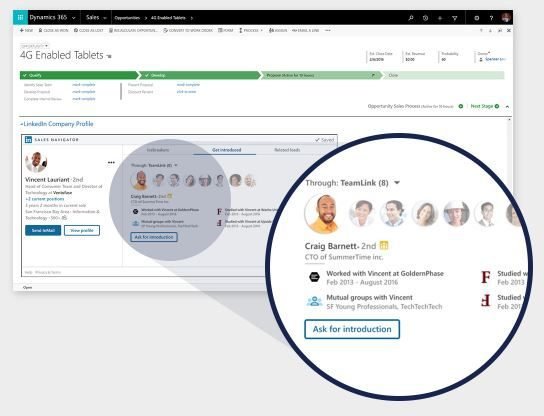
With relationship management, you can foster customer relationships through authentic, personal engagement. Businesses can unify your sales experience around relationships. With relationship-centered insights, you’ll be able to deliver the personal engagement that your customers demand and expect.

With Dynamics 365 for Sales, you will find yourself spending more time selling and less time on administration. Sales productivity increases revenue, boosts efficiency, provides key insights, and reduces costs when you automate your sales processes through a highly intuitive interface and Microsoft Office-embedded capabilities.

Sales performance will skyrocket with an internal solution that creates a culture that nurtures success. Employees can accelerate their sales performance by utilizing real-time analytics based on historical data and predictive information. The effective usability of Dynamics 365 for Sales will inspire, onboard, coach, and motivate your team to achieve more.
Contact BCS today to begin generating revenue with Dynamics 365 for Sales!

Digital Transformation | Empowering Employees

Microsoft has identified four major pillars as the core drivers for digital transformation. Leading digital change requires leaders to have a vision of how to transform their company for a digital world. The first pillar is customer engagement. For most businesses, the place to focus next is on their employees.
Organizations can’t digitally transform unless their people do. Digitization and automation are outpacing organizations’ skill level and the workforce’s ability to become proficient with the new technologies. The knowledge and insights necessary for digital transformation, exist inside your infrastructure; they're just waiting to be found.
By securely breaking down information barriers, you can understand how your employees use their time. Help maximize the impact of your workforce by taking the following steps:
- Provide a mobile experience on any device
- Make processes easier to use and more intuitive across platforms
- Reinvent collaboration productivity with Office 365
- Enable a data-driven culture with curated, easy-to-access data

Contact Bond Consulting Services today to learn more about how we can help your business transition to a cloud-first, digitally-transformed solution.

The Top 3 Ways Tech is Helping Small and Mid-Sized Businesses Succeed in the Digital, Cloud-First World
Implement Digital Transformation
Digital Transformation is connecting people and processes like never before. A common issue reported by business owners and IT managers is lost productivity spent working across multiple systems that don’t “talk” to each other. Disconnected systems cause manual processes, duplicate entries, and reports that are out-of-date before they finish running. Lack of visibility hinders decision-making and puts the longevity of your business at risk.
For businesses to survive and thrive in this new era, they must embrace digital transformation. Digital transformation is the use of digital technologies, such as mobile, social, analytics, and cloud to transform how people work and businesses operate. Employees that are utilizing digital transformation have the ability to anticipate what will happen and capitalize on those insights quickly. Businesses that are connecting their processes, systems, people, and data are able to get deep insights into what’s happening within their business.
Utilize the “Internet of Things”
The “Internet of Things” is here to stay. But what exactly is the Internet of Things? IoT, refers to the collecting and analyzing of data to identify patterns, track trends, and even predict future behaviors. The secret is to use that information for better insights into customer behavior and operational efficiency. Organizations can be proactive by tapping into the value of their data rather than reacting to past data in an attempt to thrive.
Business applications that infuse big data, advanced analytics and IoT into business processes can actively guide employees and customers to optimal outcomes. Through IoT, businesses use their data to better understand their products, customers, and markets. The challenge for each business is to understand what data is available and how it can apply to your daily operations.
Embrace Mobility
Embracing mobility fosters business success. Mobility enables businesses to put technology advancements into practice – daily, across multiple devices, and at any location. Your employees need to be connected like never before. Customers expect your sales, service, and office employees to have immediate access to the information they need to solve their problem or deliver on a good service they expect to receive.
Cloud-based business applications make it easier to give employees the information they need to stay productive, regardless of where they need to work. It’s that simple.
Contact us today to see how we can help you thrive in the digital world.
What’s New: Dynamics 365 for Financials, Business Edition

Microsoft announces the latest updates to Dynamics 365 for Financials including accountant experience, item charges, sales order to purchase order, and vendors synch with Lexmark ICS.
Accountant Experience
If you are an accountant with several clients, you can use the accountant portal as your dashboard for a better overview of your clients. From there, you can access each client's tenant in Financials. On the summary page, all client information and performance details can be seen at a quick glance. New clients can be added easily using the client cards.
Item Charges
If you want your inventory items to carry costs, such as freight, handling, or insurance, that you incur when purchasing or selling items, you can use the Item Charges features.
For purchase documents, for example, you can use item charges when you receive a separate purchase invoice for these costs, or when the costs are included in the original purchase document for the items.
You can assign item charges to lines in a purchase document that has not been posted as fully invoiced, and you can even assign costs to partially invoiced documents. You can also assign item charges received on a separate invoice to purchase document lines that have already been received or posted.
You can set up item charge codes to distinguish between different item charges, and you can define how to post the charges in the general ledger.
Financials can allocate charges to item lines either equally (by line) or by amount (proportional to line amount excl. taxes).
You can also use the Item Charges feature in sales to assign sales charges to items you've sold.
The Item charge assignment action is found in the Line ribbon or you can select the number in the Qty. to Assign field on the line.
Sales Orders to Purchase Order
From sales orders and sales invoices, you can use functions to quickly create purchase documents for missing item quantities that are required by the sale. You can use two different functions depending on the document type.
Create Purchase Orders: From a sales order, this function creates a purchase order for each vendor of items on the sales order. You can edit the purchase quantity before you create the purchase orders. Only unavailable sales quantities are suggested.
Create Purchase Invoice: From a sales order and from a sales invoice, this function creates a purchase invoice for a selected vendor for all lines or selected lines on the sales document. The full sales quantity is suggested.
Where to find it: You'll find the new function on the ribbon on sales orders and sales invoices.
Synchronize Vendors with Lexmark ICS
You can now take advantage of vendor synchronization when using Lexmark ICS. This will improve the vendor recognition rate in the Lexmark ICS and allow manual selection of vendors when performing visual training of new invoice layouts.
Vendor information including number, name, address, VAT registration, phone, and bank account data is transferred to Lexmark ICS when synchronizing.
Out of the box, synchronization is not enabled. It must be enabled in the OCR Service Setup window. When enabled, all vendors will be synchronized at once to Lexmark ICS, and from then on, any changes to a vendor or vendor bank account will trigger a synchronization of those changes.
Digital Transformation | Customer Engagement

Microsoft has identified four major pillars as the core drivers for digital transformation. Leading digital change requires leaders to have a vision of how to transform their company for a digital world. For most businesses, the place to focus first is the customer. The first pillar we will be exploring is engaging customers. By building natural, tailored experiences by harnessing data, companies are able to gain a complete view of their customer. Using this data, companies can draw actionable insights that can deliver personalization at scale and achieve a segment of one.
Customer engagement starts by understanding customer behavior. Intelligence plays a critical role in understanding and dissecting massive amounts of data to recognize patterns of sentiment and behavior across a customer base.
With the rise of mobile and social technologies, customers are now more powerful than ever. Their always-connected status and ability to find information in seconds puts them in control of their own experiences, and this trend has forced business of all sizes to rethink how they engage and connect with customers.
We are no longer focused on “touching points” during the marketing, sales, and customer service process, but instead find a need to engage in meaningful, ongoing relationships that involve frequent online and real-world interactions.
Tips on How to Engage Customers
- Customer centricity integrated across the business: Get everyone in the organization to be customer obsessed, focus on satisfaction, align customer experience and strategy, create seamless service experiences, and act based on customer insight.
- Creating fans and segments of one: Go where your customers are, personalize based on customer insights, and turn customers into engaged advocates who love your products.
- Data-driven customer insights: Take advantage of high-quality, data-driven insights and create experiences that customers really want.
- Marketing leaders as technology decision makers: Partner with IT on technology decisions and tools needed to get ahead of the competition.
Customer engagement starts by understanding customer behavior. Intelligence plays a critical role in understanding and dissecting massive amounts of data to recognize patterns of sentiment and behavior across our customer base. The roadmap for a digital-first business translates into these key priorities:
- Build the infrastructure to enable customer engagement, such as telemetry, a 360-degree view of the customer, and modern commerce systems.
- Drive viral find, try, and buy opportunities that help cross-sell and upsell, and build these capabilities into our product services.
- Ensure core services are API (application platform interface) enabled to allow simpler integration.
