

One Sale; Two Invoices in Dynamics GP
Recently, a customer of ours asked how they can invoice two customers that were splitting the cost for one piece of equipment. Since selling ½ of this product/ equipment was out of the question, we had to think of another approach. After doing a little bit of brainstorming, we came up with the following:
1. Invoice the entity that will be holding title to the equipment for the full amount
2. Back out the balance to be paid by the second entity through the Terms Discount Taken field
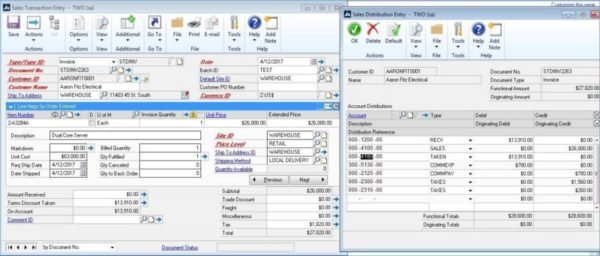
3. Create a new invoice for the second entity, but use a Non-Inventory item (this item happens to have a period at the end)

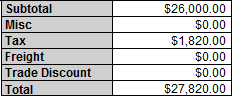
In concept, this should work as both customers would be receiving invoices for their respective balances due. The only issue we can foresee is that the formatting for the standard Dynamics GP invoice comes with the summarized amounts for the sale and not the amount due. This may require some modifications to be made within Report Writer to show the correct On Account balance for the first customer invoiced.
Please check back on our blog series where we walk you through this process.
 George Rios is a Microsoft Dynamics® GP Certified Professional and senior consultant at Bond Consulting Services. He has over 13 years of work experience with accounting and accounting systems.

How business continuity plans can fail
Your service provider, who you have tasked with looking after your company’s IT, has kept your business up and running for the past 10 years. Usually, that kind of longevity in developing continuity plans has resulted to some providers overlooking or underestimating certain issues. Here are some of them.
Over-optimistic testing
The initial testing attempt is usually the most important as it’s when IT service providers can pinpoint possible weak points in the recovery plan. However, what usually happens is a full transfer of system and accompanying operations to the backup site. This makes it difficult to look at specific points of backup with too many factors flowing in all at the same time.
Insufficient remote user licenses
A remote user license is given by service providers to businesses so that when a disaster strikes, employees can log in to a remote desktop software. However, the number of licenses a provider has may be limited. In some cases, more employees will need to have access to the remote desktop software than a provider’s license can allow.
Lost digital IDs
When a disaster strikes, employees will usually need their digital IDs so they can log in to the provider’s remote system while their own system at the office is being restored. However, digital IDs are tied to an employee’s desktop and when a desktop is being backed up, they are not automatically saved. So when an employee goes back to using their ‘ready and restored’ desktop, they are unable to access the system with their previous digital ID.
Absence of communications strategy
IT service providers will use email to notify and communicate with business owners and their employees when a disaster happens. However, this form of communication may not always be reliable in certain cases such as the Internet being cut off or with spam intrusions. There are third-party notification systems available, but they are quite expensive and some providers sell them as a pricey add-on service.
Backups that require labored validation
After a system has been restored, IT technicians and business owners need to check whether the restoration is thorough and complete. This validation becomes a waste of time and effort when the log reports come in a manner that is not easy to compare. This usually happens when IT service providers utilize backup applications that do not come with their own log modules, and have to be acquired separately.
These are just some of the many reasons why business continuity plans fail. It is important for business owners to be involved with any process that pertains to their IT infrastructure. Just because you believe something works doesn’t necessarily mean that it works correctly or effectively. If you have questions regarding your business continuity plan, get in touch with our experts today.
Long Beach Entrepreneur Bob Bond Reflects on His Journey as a Small Business Owner
On April 28th, I had the pleasure of attending the 15th Annual Entrepreneur of the Year Awards sponsored by the Long Beach Chamber. It was a great event, and a great opportunity to reflect on the founding of Bond Consulting Services (BCS) back in April 2000. At the time, my wife Alyssa and I just had our second baby, and we wanted a more flexible schedule to allow time for family and careers. I had 12 years of accounting and business systems experience with a couple very large companies (Deloitte and Fox) and one smaller entrepreneurial company (Pegnato Building System Services). Alyssa is an Attorney, and she also decided to start her own practice in April 2000, which provided lots of flexibility for us, but a lot uncertainty and risk.
The economic climate in 2000 was healthy as we all “survived” the Y2K crisis (that never happened), but we were starting to experience the DotCom burst. BCS’ focus on Great Plains Software implementations and support was well received in the marketplace, as stable integrated business software was finally evolving after the cobbling together of various half-baked solutions in the nineties. Clients appreciated our hands-on collaborative approach to integrating technology, accounting and operations. Microsoft validated our strategic direction by purchasing Great Plains Software in 2001, which began our extensive relationship Microsoft.
 Growing the practice has been full of exciting opportunities and challenges. In 2003, we hired our second team member, George Rios, who is still a highly valued member of our BCS team today. George helped us scout out our office location, in which we have expanded office space significantly over the years, but we’re still in the same building. We continued to add team members and solutions to our portfolio, deploying CRM version 3 internally and for our clients in 2007. Things were humming along until mid-2008, when the stock and real estate markets tanked and the Great Recession hit. Fortunately for BCS, we were involved in a few very large projects that continued into 2010, when we were forced to cut back some of our growth.
We started our recovery in 2011 with several new clients that felt it was time to invest in new technology after holding back on new investments for several prior years. In 2012, the U.S. economic recovery was still quite slow, which allowed us to learn and help clients deploy another solution, Dynamics AX. Our focus on these three applications, Microsoft Dynamics GP, AX & CRM, enables us to provide solutions for accounting, distribution, manufacturing, sales, marketing and service operations for both small and mid-market companies. We now have 14 BCS employees and many very active partners that we work closely with to serve our great clients. In fact, our BCS company revenue hit an all-time high in 2015, and we’re on track to keep growing going forward.
I’m proud to say that my entrepreneurial aspirations continue to be realized through BCS. I’m very pleased to have such an amazing team of professionals working for BCS, along with our fantastic partners and clients that help make our business such a success. Everyday, we truly live our BCS mission… “To improve the lives and business success of our clients, team members and partners.” I’m also very happy to say that Alyssa’s law practice is still thriving, our oldest daughter is back east in college, and our second daughter is selecting colleges to begin her career aspirations…the cycle of life continues.
 Bob Bond has 20+ years of experience implementing and supporting business systems, primarily Dynamics GP, AX & CRM for manufacturers & distributors. Bob founded Bond Consulting Services (BCS) in 2000 to help mid-market clients leverage Microsoft technology to improve business processes, efficiency & profitability. He is a member of the International Association of Microsoft Channel Partners (IAMCP), Long Beach Area Chamber of Commerce, Long Beach Rotary Club and Provisors.
Listen to Bob Bond Discuss ERP and CRM for Small Business
Read Excellence in Business Software by Bob Bond
Sharing Microsoft Community Connections Success with South Bay Chambers of Commerce
Last night's South Bay of L.A. Chamber Networking Event was a huge success with 100+ guests from multiple chambers of commerce organizations in L.A. County and a beautiful view from inside the Stadium Club at the L.A. Galaxy/Stub Hub Center. Here's a photo recap of the event:

Photo Recap: South Bay of L.A. Chamber Networking Event
There was not a shortage of business cards in the room! Networking, Networking, Networking!


We anticipated this eventand had a great time with the lively crowd. Our marketing manager, Sharreace Baldwin, along with Brian Iinuma from Strategic Systems Group, Inc. led the conversation about how the Microsoft Community Connections program connects business organizations with Microsoft partners to offer technology education.


What would a savvy business networking event be without Microsoft swag? Two team members from the Microsoft Store at Los Cerritos were on hand with the latest devices and free giveaways. Microsoft was a premier sponsor of the event.

A HUGE thank you to everyone who attended our presentation and talked with us about some of their business technology concerns. We hope to participate in another collaborative mixer soon!

Thank you:
LA Galaxy/Stub Hub Center
Brian Iinuma
Daniel Iinuma
Jim O'Callaghan
Bryan Duran
Manhattan Beach Chamber of Commerce
Scott Smith
Cerritos Regional Chamber of Commerce
Long Beach Area Chamber of Commerce
Redondo Beach Chamber of Commerce
Hermosa Beach Chamber of Commerce
Lomita Chamber of Commerce
Carson Chamber of Commerce
Gardena Chamber of Commerce
San Pedro Chamber of Commerce
Ingelwood Airport Area Chamber of Commerce
Wilmington Chamber of Commerce
Downey Chamber of Commerce


The tax you probably owe, but aren’t paying: A closer look at consumer use tax compliance
Use tax, the lesser known counterpart of sales tax, suffers from a basic lack of PR. Buyers and sellers alike pay it no mind. Despite 27 states having a dedicated line item in tax returns for reporting use tax owed, only 2% of taxpayers actually report it. This has left the states with a $23 billion deficit annually in uncollected use tax.
It’s much harder to enforce use tax compliance on individuals, so states look to businesses to close this gap. The propensity for companies to overlook use tax makes it an easy target for auditors. In fact, state auditors say it’s the number one audit risk for businesses. Don’t get caught with your compliance down. This quick rundown of the basics will get you up to speed and on task.
What’s in a name?
There are two types of use tax: sellers use tax and consumer use tax. As a best practice, you should familiarize with both, however, of the two, consumer use tax typically causes businesses the most trouble. Blame it on the name. The trick with consumer use tax is that the consumer isn’t always an individual; sometimes it’s a business or even the seller that owes the tax. Consumer use tax is owed on any taxable purchase where sales tax wasn’t collected at the time of the transaction. If you didn’t pay sales tax (or you paid a lower sales tax rate than your state charges) for taxable products or services you used in your business, you are obligated to pay consumer use tax.

All 45 U.S. states that have sales tax also have use tax. The two rates are often the same, but not always. Despite a federal law that says use tax rates can’t exceed sales tax rates, some jurisdictions still impose higher use tax rates on certain transactions, for example in Alabama. Even if you know the sales tax rates in the jurisdictions where you collect and remit sales tax, you should also confirm the correct use tax rates to ensure compliance.
Owe or no?
Like sales tax, certain exemptions also apply to use tax. One of the most common is manufacturing equipment. Typically, use tax is not due on equipment used to manufacture other goods. But the distinction can be very specific and varies by state. So it’s important to look at these exemptions carefully before applying them. Keeping track of these exemptions – and any changes to them – can be difficult, however, especially if you do business in multiple states or jurisdictions.
Getting buy in
Certain states require remote vendors to notify customers of use tax obligations. Oklahoma and South Carolina, for example, require use tax notices on websites, catalogs, and invoices. North Dakota extends this to purchase orders and packing slips. Colorado requires remote retailers to submit a detailed report annually to the Department of Revenue of all in-state customers and sale, an unfavorable compliance burden that led to a lawsuit.
What’s the Use of Use Tax? Five Tips for Consumer Use Tax Compliance.
As a business, your obligations around consumer use tax can be difficult to manage. Get perspective by reading What’s the Use of Use Tax? Five Tips for Consumer Use Tax Compliance. This paper provides best practices for compliance including sound rationale for automation – something that can easily be done in your ERP, accounting or ecommerce system with software like Avalara AvaTax. READ NOW
Register for our webinar: Be Prepared with Sales Tax CPR
Webinar: Be Prepared with Sales Tax CPR w/Avalara
Date: Tuesday, April 19, 2016
Time: 10:00 a.m. (PT)
Register Now
This article was originally published by Avalara.
Tips to use Office 365 more productively
A paintbrush can create the Mona Lisa or the Last Supper. An airplane can bring passengers to exotic locations anywhere on the planet. And stone, deftly placed can produce wonders such as the Pyramids or Angkor Wat. But what do the paintbrush, airplane and stone all have in common? Without the wisdom of the painter, pilot or architect, they are nothing more than tools and materials. Office 365 is no different. Yes, within it is the potential for your business to gain huge productivity gains, but without the proper knowledge to utilize the service correctly, you’ll see small returns. So here is how your business can use Office 365 to gain more productivity and create something beautiful.
Get all staff onboard
To maximize your company’s productivity on Office 365, every employee that uses a computer needs to utilize it. While this may sound easier said than done, you can encourage company-wide use by getting the leaders of your company to use it first. When your executives, managers and top employees are all using and promoting Office 365, it sets a good example that will help persuade all employees to fall in line.
Train employees
If your employees don’t know how to use Office 365, you will see little gains in productivity, and the cloud service becomes a wasted investment. This is why training is absolutely vital. Teach your staff all the ins and outs of the platform, so they can take full advantage of it.
One way to efficiently train your staff is to create or gather a series of short training videos, only a few minute in length. Shorter videos are easy to digest for your employees and help them retain the info. Best of all, they can be reviewed again and again, and used for all employees. This saves time for management, who is often responsible for employee training.
Utilize core tools
When you first implemented Office 365, what sold you on it? Likely it was the fact that it increases staff productivity by allowing them to work and collaborate from anywhere. So if you’re not yet utilizing the tools that enables them to do that, there’s no better time than now to get started.
Some of the core tools that enable you and your staff to become more productive and work from anywhere are OneDrive for Business (OD4B), SharePoint and Skype for Business. OD4B and SharePoint enable your staff to upload and save documents to a virtual drive, share that document with another group or user, and then edit it at the same time. This gives you and your employees the ability to access that document from anywhere, and essentially work from anywhere. Skype for Business also enhances productivity by creating a more flexible communication channel. Employees, colleagues and customers, can communicate easily wherever they may be in the world. From online meetings, to conference calls, video calls and instant messaging, you have a wealth of options for instant communication.
Don’t forget security
Not only can a security breach cost you money, but it can also destroy your employees productivity. While Office 365 already has security built in with Azure Active Directory, you should still be cautious of what files you add and share on the service. If you do upload files with sensitive company information to the platform, it’s wise to keep them under you or your executives direct control.
These four productivity tips should help your business make the most out of Office 365. If you’d like more ideas on how to better utilize the platform, make it more secure or need additional training, give us a call. We are happy to share our expertise for your maximum gain.
Learn how SalesPad Enhances Dynamics GP
SalesPad Solutions has been described as “Simple, efficient sales and customer service tools for use with Dynamics GP." On Tuesday, February 16, we'll be joined by SalesPad to present their tools for manufacturers and distributors. In just one hour, see the tools that your sales, customer service, inventory, operations, warehouse, and management teams will love.
Register for the webinar here.
*As a bonus, webinar participants SalesPad Mobile licenses half off for the first full year PLUS 15% off any SalesPad products on their first order purchased by 12/31/16.

SalesPad is a leader in improving distribution systems. They prove this in their recent article: Seize Growth Opportunities by Optimizing Distribution Systems, Enhancing Supply Chains
[youtube https://www.youtube.com/watch?v=GjeTviNLWwY?rel=0&controls=0&showinfo=0&w=560&h=315]
Bond Consulting Services Top 10 Highlights of 2015
This year has been fantastic for so many reasons. We accomplished a lot and had many proud and successful moments in 2015. As we approach the end of the year, we'd like to take this time to share 10 key highlights. We hope you enjoy a short trip down memory lane of 2015 top highlights for Bond Consulting Services.
1. Supporting hundreds of business professionals with Microsoft Dynamics solutions
Receiving positive feedback in return from our happy customers.

2. Incredible growth with business development and teamwork
We celebrated a little with a fun day of go kart racing!

3. Winning two major IAMCP awards
We announced winning IAMCP Worldwide Partner 2015 and IAMCP P2P Partner 2015 in a press release.

4. Impactful engagement with Microsoft partners at IAMCP and lots of great partnering

5. Establishing a wonderful relationship with the great team at our local Microsoft Store
And the exciting opportunities with local chambers of commerce, and the SBA to teach local small business owners about CRM and business technology.

6. Enhancing our relationships with ISVs and doubling our webinars

7. Our Dynamics GP guru, Mike Zapp representing our team as a member of the Association of Dynamics Professionals

8. Attending numerous Microsoft events
And meeting hundreds of Microsoft partners and industry experts, plus David Gersten’s special trip to Washington, DC to advocate for the LEADS Act.

9. Expanding our brand awareness
With a podcast, numerous articles, panel discussion opportunities and major online visibility via social media with increased Twitter and LinkedIn followers and YouTube subscribers.

10. Working with the best intern ever – Ricky Contreras
We blogged about our awesome experience with Ricky Contreras, the best intern ever.

We look forward to a great 2016! Happy New Year!
2015 GPUG Summit Recap: Highlights for Bond Consulting Services
Last month, we announced that we would be attending the GPUG Summit Conference in Reno, NV. Little did we know, it would be one of the most exciting events of 2015! This year's Dynamics GP User Group Summit was as exciting as it was successful for the BCS team. Members of our Sales, Marketing and Technical teams attended the event; Sharreace Baldwin, Marketing Manager, David Gersten, VP Customer Success & Strategic Relationships, Robin Mayne, Business Development Executive and Mike Zapp, Technical Project Manager. It was an adventure for all.
Mike Zapp contributed his Dynamics GP expertise by participating as a 'GPUG Medic', coming to the technical aid of Dynamics GP users, with on the spot solutions!

Attending GPUG Summit was a first for our Sales team. Our Business Development Executive, Robin Mayne, shared her experience.

This was my first Microsoft Dynamics Summit. I am not new to conferences as I have been going for over 15 years now. What I liked about this one was the flow and the mix of breakout sessions, expo halls, networking and lunches this was one of the best I have been to. You were able to pick and choose which sessions were of most value to you. Networking in the expo hall and visiting all the different booths helped me learn how the ISV’s products integrate with the products we sell. I learned so much about all the different ISV’s that we as a Microsoft Dynamics provider can partner with, and how it can make the joint effort more successful and the customer more satisfied.
Lastly, sitting down with different customers and asking them about their experiences not only at Summit, but with using GP and AX helped me learn what the customers expectation were, and what they liked (and didn’t like) in a Microsoft partner which I feel was invaluable information for me as a new sales person in the Microsoft world. I feel going to Summit was a huge benefit to me professionally and for our company and customers ultimately.
David Gersten's recap of his first GPUG Summit experience:

I have been to many conferences in my past but this was my first GP User Group summit I had ever attended. This experience to me can be defined by one word “Community” – ironically I had similar feelings when I went to our most recent Worldwide Partner Conference too.
With several thousand people gathering in one space, including end users, ISVs and other Dynamic Partners, the group just seemed to be together very well. End users were helping end users, ISVs were helping ISVs and most of all Dynamic Partners (normally competitive in nature) helped other Dynamic Partners.
The informality of the experience made it more fun to experience, more comfortable to network, and more enjoyable to learn. I look forward to attending next year’s summit again and hope many more of our clients will join us too!
Audio: Listen to David Gersten featured on the Reno Recap edition of Enterprise Software Podcast
[youtube https://www.youtube.com/watch?v=zmYGkk6gdtU?rel=0&controls=0&showinfo=0&w=560&h=315]
Sharreace Baldwin, Marketing Manager, penned a recap of her first GPUG Summit experience on GPUG.com. Read it here.

Check out more 2015 GPUG Summit photos on Facebook!
What is GPUG Summit?
Top 5 Reasons to Use SmartView by eOne Solutions
At Bond Consulting Services, we only recommend solutions that we think provide great value to our customers’ business. With that in mind, one of the solutions we’d like to introduce you to is SmartView by eOne – the team behind SmartList Builder, Extender, and more. SmartView makes working with SmartList the easiest things your users will do.
Top 5 Reasons to Use SmartView
1. You use SmartList all day, every day. – SmartView provides you with the ability to see your lists in fractions of a second.
2. You need an easy way for your users to work with the data. – You can now add and remove the columns that you want to see on your list, drag and drop your column headers to rearrange your column order and group and subgroup, see your totals to screen, export or copy and paste to Excel in seconds and much more.
3. You need more filters! - Don’t just stop at 4 filters, SmartView allows you to add as many filters as you need to your SmartList.
4. You currently use SmartList Builder. - If you have created the lists you need, pulling the data from the places you need it – then view it in SmartView. SmartList Builder and SmartView are complementary products that work best together.
5. You have users in GP for the sole purpose of seeing a SmartList. - Cut out the expensive user licenses and give those users access to SmartView through the desktop application.
If you’d like to learn more about SmartView, please join our November 17 webinar here.
Would you like to see a demo? Please contact us here.